

本文详细解析基于JavaScript的图形验证码实现方案。内容涵盖从路由层获取验证码数据、EJS模板渲染、前端JS交互逻辑到CSS样式控制的完整流程。重点介绍了如何通过异步并行获取验证码及nonce值,并在前端进行输入校验与错误提示,最终实现合法跳转至私密页面的功能。
JavaScript 实现图形验证码完整流程解析
本节介绍如何使用 JavaScript 制作图形验证码。
实际效果展示
接下来展示实际运行的效果。
首先,在需要展示验证码的页面中,当用户点击“营业执照”按钮时,系统会弹出一个对话框。该对话框顶部显示图形验证码,具体界面效果如图一所示:
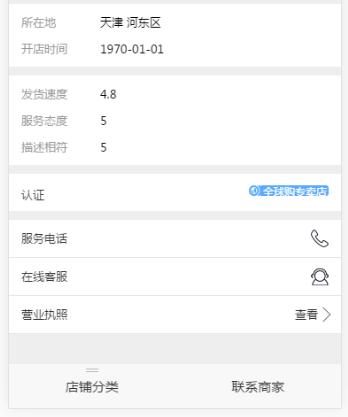 (图一)
对话框的具体样式设计如图二所示:
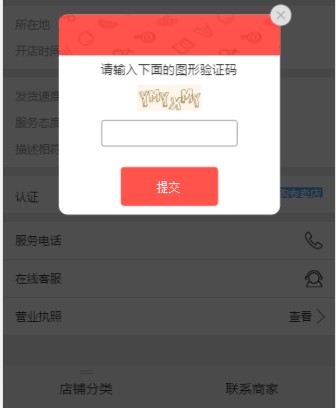 (图二)
系统需要对用户输入的验证码值进行校验,以判断输入是否正确。如果输入错误,系统将提示错误信息,错误提示界面如图三所示:
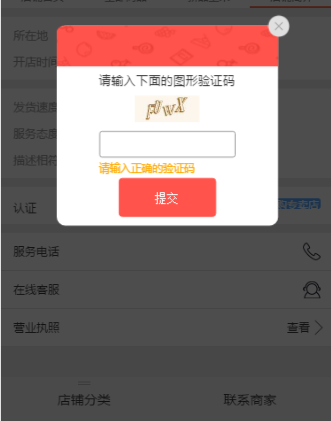 (图三)
若页面验证通过,则不会显示错误信息,并会自动跳转至目标页面,跳转后的界面如图四所示:
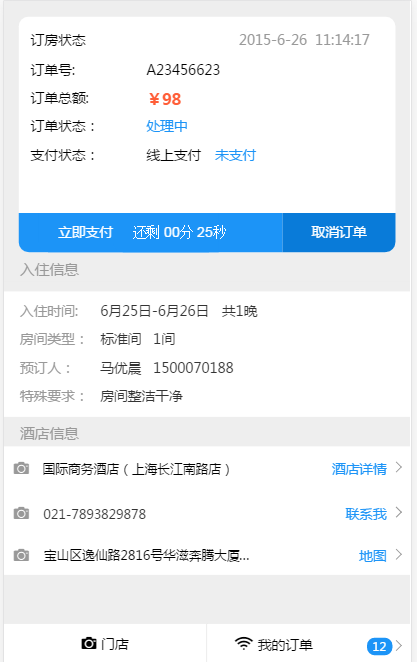 (图四)
——–营业执照页面为私密页面,使用其他页面代替原图。
代码实现细节
以下是路由层的代码描述。
//1-在路由层进行设置,页面跳转到根目录下/buyer/vshop/info.ejs页面进行跳转,然后在回调函数中进行接口的调用

        router.get('/buyer/vshop/info', function(req, res, next) {
//2-调用接口获取数据

        async.parallel({
          verifycode :function(fn){
 //3-调用接口获取本机的IP地址

        var args= {
           userIp: tools.getClientIp(req)
         };

//4-调用接口verifyCodeHelper的createVcode方法获取captcha与 csnonce的数据,他们的值都是接口verifyCodeHelper返回的数据

            verifyCodeHelper.createVcode(args, function(err, result){
              if (err) {
                console.log(err);
              }
              else{
                fn(null, {
                  captcha: result.data.queryUrl,
                  csnonce: result.csnonce || 0
                })
              }
            });
          }
        },function(err, result){
          if (err) {
            res.end(err);
          }else{
            result.getDetail= res.shopInfo;
            var fxzStatus = res.fxzStatus || {};

//5-进行根目录下buyer/vshop/describe页面的渲染,传递相关参数到EJS页面

            res.render("buyer/vshop/describe", {
              title: srcBizType==1 ? result.getDetail.name : "店铺简介",
              pageName:"vshopInfo",
              captcha:result.verifycode.captcha,//验证码
              isTencent: 1,
              csnonce:result.verifycode.csnonce
            });
          }
        });
      });
以下是 EJS 模板层的代码描述。
//1-获取路由传递的 csnonce

    <script>
      APP.newLogin= {
        csnonce: '<%- csnonce %>',
      };
    </script>

//2-获取路由传递的captcha

    <script type="text/javascript" src="<%= captcha %>"></script>

//3-引入相关JS文件

    <script>
      seajs.use("js_cmd/vshop/home-cmd");
    </script>
    <link href="/css/vshop/describe.css?v=<%= config.version %>" rel="stylesheet" />
    <style id="dynamic"></style>
    <div class="arrow_mask"></div>
    <div class="arrow">
      <div>
        <img src="/imgs/vshop/verification-code-back.png" class="verification-code-back" />
      </div>
      <ul class="arrow-mess"> <span class="sku-close" id="btn_sku_dialog_close"> </span>
        <li>请输入下面的图形验证码</li>
        <li>
            <img id="J_BtnVerifyPicCodeTencent" src="" class="captcha" style="height:30px;margin:0 15px;" />
        </li>
        <li>
          <div class="btn_mes">
            <input class="btn_mes_text" type="text" maxlength="6">
          </div>
        </li>
      </ul>
      <div class="btn_mes2">
        <input type="button" class="license-submit" value="提交">
      </div>
    </div>
    <div data-role="container" class="body <%= pageName %>">
      <header data-role="header">
        <%- include ./widget_vshop %>
      </header>
      <section data-role="body" class="section-body">
        <div class="div-section div-section-info">
          <ul class="info1">
            <li class="gap"><div class="left">所在地</div><div class="right"><%- detail.address%></div></li>
            <li><div class="left">开店时间</div><div class="right"><%- detail.createTime%></div></li>
          </ul>
          <ul class="info2">
            <li class="gap"><div class="left">发货速度</div><div class="right"><%- detail.score.express%></div></li>
            <li class="gap"><div class="left">服务态度</div><div class="right"><%- detail.score.service%></div></li>
            <li><div class="left">描述相符</div><div class="right"><%- detail.score.describe%></div></li>
          </ul>
          <ul class="info3">
            <%if(detail.shopTypeIndex==1||detail.shopTypeIndex==2||detail.shopTypeIndex==3){var bg = '/imgs/vshop/tip.png',color='#39dda5' }else{var bg = '/imgs/vshop/tip3.png',color='#59aaff'}%>
            <li><div class="left anotherC">认证</div><div class="right textR"><span style="background: url(<%-bg%>) left 1px no-repeat;background-size: 14px 12px;"><i style="background: <%-color%>"><%- detail.shopType %></i></span></div></li>
          </ul>
          <ul class="info4">
            <li><a href="tel:<%- detail.phone%>" class="tel">服务电话</a></li>
            <li><a data-aid="<%- aid%>" class="webim">在线客服</a></li>
            <li class="business-license">
              <!--<a href="/buyer/vshop/license?aid=<%- aid%>">-->
              <a href="#">
                <span >营业执照</span>
                <label>查看<span></span></label>
              </a>

            </li>
          </ul>
        </div>
        <%- include ./footer %>
        <div id="vue_hooker">
          <child-nav></child-nav>
          <%- include ../../widget_navBtns %>
        </div>
      </section>
    </div>
以下是 JavaScript 逻辑层的代码描述。
//1-引入页面所需的各个模块
    define(function (require, exports, module) {
      var $ = require("./top-suction-cmd"),
        Vue = require("lib_cmd/vue-cmd"),
        $eles = {},
        eles = {};

  //2-Vue实例化
      var vm = new Vue({
        data: {},
        methods: {}
      });

  //3- 页面初始化函数

      function initPage() {
        vm.$mount('#vue_hooker');
        window.scroll(0,0);
      }
  //4- 验证码相关处理函数
      function license(){
        $('.info4 .business-license').click(function (ev) { //弹层
          $('.btn_mes_text').val("");
          $('.arrow_mask').show();
          $('.arrow').show();
          $('#nav_omit').remove();
        });
        $('#btn_sku_dialog_close').click(function(ev){//弹窗
          $('.arrow_mask').hide();
          $('.arrow').hide();
          $('.btn_mes_text').val("");
        });

        $('.btn_mes_text').focus(function(){ //输入框获得焦点
          $('.btn_mes_text').val("");
          if($('.verification-code').length!=0){
            $('.verification-code').remove();
          }
        });
        $('.license-submit').click(function(){
          APP.verifyPicCode();
        });

      }

  //5- 验证码初始化函数() TSOCapObj是腾讯接口里面的方法

      function verify_initPage(){
        $('#J_BtnVerifyPicCodeTencent').on('click', function () {
          TSOCapObj.refresh();
        });
  //6-初始化,参数传入显示验证码的元素imgid
        TSOCapObj.init("J_BtnVerifyPicCodeTencent");
        //刷新拉取验证码图片
        TSOCapObj.refresh();

        APP.verifyPicCode= function(fn) {
          //获取用户输入
          var ans = $(".btn_mes_text").val();
          //验证答案,验证完成后会回调第二个参数传入的函数
          TSOCapObj.verify(ans , function(ret_json){
            if (ret_json.errorCode!=0) {
              $(".btn_mes_text").val("");
              TSOCapObj.refresh();
              //tip("图形验证码输入错误!");
              if($('.verification-code').length==0){
                $('.btn_mes').eq(0).append(" <div class='verification-code'>请输入正确的验证码</div>");
              }
              $('.btn_mes_text').blur(function(){
                $('.btn_mes_text').text("");
              });
            } else {
              window.location="/buyer/vshop/license?aid=" + APP.aid;
              fn(ret_json.ticket);
            }
          });
        }
      }

  //7- 页面初始化函数的执行
      $(function () {
        initPage();
        license();
        verify_initPage();
      });

    });
以下是 CSS 样式层的代码描述。
@import url(common.css);

    .div-section-info .info4{padding: 0}
    .div-section-info .info4 li{
      padding: 11px 14px;
      line-height: 20px;
      border-bottom: 1px solid #e6e6e6;

    }
    .div-section-info .info4 li a{
      color: #333;

      display: block;
    }
    .div-section-info .info4 li a.tel{
      background: url(/imgs/vshop/callAndMsg.png) no-repeat;
      background-size: 20px 60px;
       background-position: right 0;
    }
    .div-section-info .info4 li a.webim{
      background: url(/imgs/vshop/callAndMsg.png) no-repeat;
      background-size: 20px 60px;
      background-position: right -30px;
    }
    .div-section-info .info4 li a label{
      display: block;
      float: right;
    }

    .div-section-info .info4 li a label span{
      display: block;
      width: 12px;
      height: 12px;
      border-right:1px solid #666;
      border-bottom:1px solid #666;
      -webkit-transform:rotate(-45deg);
      float: right;
      margin-top: 4px;

    }
    .arrow_mask {
      position: fixed;
      top: 0;
      left: 0;
      bottom: 0;
      right: 0;
      z-index: 101;
      display: none;
      background: black;
      opacity: 0.7;
    }
    .arrow{
      width: 250px;
      height: 226px;
      background-color: #FFFFFF;
      position: fixed;
      top: 50%;
      left: 50%;
      z-index: 102;
      -webkit-transform: translate(-50%, -50%);
      -moz-transform: translate(-50%, -50%);
      -ms-transform: translate(-50%, -50%);
      -o-transform: translate(-50%, -50%);
      transform: translate(-50%, -50%);
      border-radius: 10px;
      display: none;
    }
    .arrow-mess li:nth-of-type(1){
      text-align: center;
      margin-bottom: 8px;
      font-size: 14px;
      color: #333333;
    }
    .arrow-mess li:nth-of-type(2){
      text-align: center;
      margin-bottom: 10px;
    }
    .arrow-mess li:nth-of-type(3) input{
      width: 100%;
      height: 30px;
      border: 1px solid #979797;
      text-align: center;
      border-radius: 3px;
      font-family: PingFangSC-Regular;
      font-size: 16px;
      color: #333333;
      letter-spacing: 0px;
    }
    .btn_mes{
      margin-bottom: 15px;
      width: 100%;
      padding-left: 48px;
      padding-right: 48px;
      position: relative;
    }
    .btn_mes2{
      width: 100%;
      padding-left: 70px;
      padding-right: 70px;
      /* position: relative; */
      position: absolute;
      bottom: 0px;
      margin-bottom: 10px;
    }

    .license-submit{
      width: 100%;
      height: 44px;
      background: #FF534C;
      border: 1px solid #FF534C;
      font-size: 14px;
      border-radius: 4px;
      color: #FFFFFF;
    }

    .sku-close {
      background: url(/imgs/vshop/verification-code-del.png) no-repeat right;
      -webkit-background-size: 25px auto;
      display: inline-block;
      width: 26px;
      height: 26px;
      position: absolute;
      right: 0px;
      top: 0px;
      margin-right: -13px;
      margin-top: -13px;
    }
    .verification-code{
      z-index: 102;
      color: #FFAA00;
      position: absolute;
      font-size: 12px;
      top: 4px;
    }
    .verification-code-back{
      width: 100%;
      position: absolute;
      height: 46px;
    }
    .arrow div:nth-of-type(1){
      position: relative;
    }
    .arrow-mess{
      margin-top: 52px;
    }