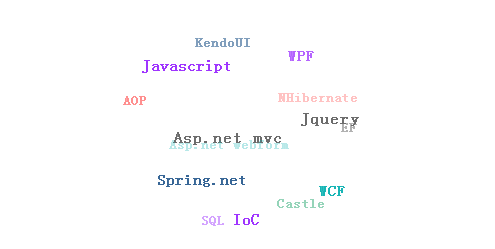
本文提供了一段JavaScript实现关键字球状旋转效果的完整代码。通过HTML定义标签容器,CSS设置绝对定位与样式,JS利用三角函数计算坐标并动态更新位置、大小和透明度,实现鼠标交互下的3D旋转动画。
关键字球状旋转效果实现概述
在浏览网页时,常能看到博客中展示的关键字旋转特效,视觉效果十分出色。为了掌握这一效果,笔者查阅相关资料并尝试自行编写实现代码。
HTML结构搭建
HTML结构如下:
具体代码实现:
<!DOCTYPE html PUBLIC "-//W3C//DTD XHTML 1.0 Transitional//EN" "http://www.w3.org/TR/xhtml1/DTD/xhtml1-transitional.dtd">
<html xmlns="http://www.w3.org/1999/xhtml">
<head>
<meta http-equiv="Content-Type" content="text/html; charset=gb2312" />
<title></title>
<link rel="stylesheet" href="css/style.css" />
<script type="text/javascript" src="js/lrtk.js"></script>
</head>
<body>
<!-- 代码开始 -->
<div id="div1">
<a >Asp.net webform</a>
<a >Asp.net mvc</a>
<a >EF</a>
<a >Castle</a>
<a >Spring.net</a>
<a >NHibernate</a>
<a >WCF</a>
<a >WPF</a>
<a >AOP</a>
<a >IoC</a>
<a >SQL</a>
<a >Javascript</a>
<a >Jquery</a>
<a >KendoUI</a>
</div>
</body>
</html>
CSS样式定义
CSS样式定义:
相关CSS代码如下:
#div1{height:400px;width:450px; position:relative; margin:10px auto;}
#div1 a{position:absolute;top:0px;left:0px;font-weight:bold;padding:3px 6px; color:black; text-decoration: none;}
#div1 a:hover{border:1px solid #eee;background:#ccc;border-radius:5px;}
颜色随机分配逻辑
为了增强视觉效果,建议为关键字赋予不同颜色。代码中初始化了一个颜色数组,并随机分配给各个标签元素。
颜色分配相关代码:
var colors = ["#FF60AF","#9F35FF","#FF2D2D","#6C6C6C","#003D79","#00AEAE","#019858"];
var rand = Math.ceil(Math.random()*6);
aA[i].style.color=colors[rand];
JavaScript核心算法
JavaScript逻辑实现:
核心JS代码段:
var radius = 100;
var dtr = Math.PI/180;
var d=300;
var mcList = [];
var active = false;
var lasta = 1;
var lastb = 1;
var distr = true;
var tspeed=2;
var size=250;
var mouseX=0;
var mouseY=0;
var howElliptical=1;
var aA=null;
var oDiv=null;
window.onload=function ()
{
 var i=0;
 var oTag=null;
 oDiv=document.getElementById('div1');
 aA=oDiv.getElementsByTagName('a');
 for(i=0;i<aA.length;i++)
 {
 var colors = ["#FF60AF","#9F35FF","#FF2D2D","#6C6C6C","#003D79","#00AEAE","#019858"];
 var rand = Math.ceil(Math.random()*6);
 aA[i].style.color=colors[rand];
 oTag={};
 oTag.offsetWidth=aA[i].offsetWidth;
 oTag.offsetHeight=aA[i].offsetHeight;
 mcList.push(oTag);
 }
 sineCosine( 0,0,0 );
 positionAll();
 oDiv.onmouseover=function ()
 {
 active=true;
 };
 oDiv.onmouseout=function ()
 {
 active=false;
 };
 oDiv.onmousemove=function (ev)
 {
 var oEvent=window.event || ev;
 mouseX=oEvent.clientX-(oDiv.offsetLeft+oDiv.offsetWidth/2);
 mouseY=oEvent.clientY-(oDiv.offsetTop+oDiv.offsetHeight/2);
 mouseX/=5;
 mouseY/=5;
 };
 setInterval(update, 10);
};
function update()
{
 var a;
 var b;
 if(active)
 {
 a = (-Math.min( Math.max( -mouseY, -size ), size ) / radius ) * tspeed;
 b = (Math.min( Math.max( -mouseX, -size ), size ) / radius ) * tspeed;
 }
 else
 {
 a = lasta * 0.98;
 b = lastb * 0.98;
 }
 lasta=a;
 lastb=b;
 if(Math.abs(a)<=0.01 && Math.abs(b)<=0.01)
 {
 return;
 }
 var c=0;
 sineCosine(a,b,c);
 for(var j=0;j<mcList.length;j++)
 {
 var rx1=mcList[j].cx;
 var ry1=mcList[j].cy*ca+mcList[j].cz*(-sa);
 var rz1=mcList[j].cy*sa+mcList[j].cz*ca;
 var rx2=rx1*cb+rz1*sb;
 var ry2=ry1;
 var rz2=rx1*(-sb)+rz1*cb;
 var rx3=rx2*cc+ry2*(-sc);
 var ry3=rx2*sc+ry2*cc;
 var rz3=rz2;
 mcList[j].cx=rx3;
 mcList[j].cy=ry3;
 mcList[j].cz=rz3;
 per=d/(d+rz3);
 mcList[j].x=(howElliptical*rx3*per)-(howElliptical*2);
 mcList[j].y=ry3*per;
 mcList[j].scale=per;
 mcList[j].alpha=per;
 mcList[j].alpha=(mcList[j].alpha-0.6)*(10/6);
 }
 doPosition();
 depthSort();
}
function depthSort()
{
 var i=0;
 var aTmp=[];
 for(i=0;i<aA.length;i++)
 {
 aTmp.push(aA[i]);
 }
 aTmp.sort
 (
 function (vItem1, vItem2)
 {
 if(vItem1.cz>vItem2.cz)
 {
 return -1;
 }
 else if(vItem1.cz<vItem2.cz)
 {
 return 1;
 }
 else
 {
 return 0;
 }
 }
 );
 for(i=0;i<aTmp.length;i++)
 {
 aTmp[i].style.zIndex=i;
 }
}
function positionAll()
{
 var phi=0;
 var theta=0;
 var max=mcList.length;
 var i=0;
 var aTmp=[];
 var oFragment=document.createDocumentFragment();
 //随机排序
 for(i=0;i<aA.length;i++)
 {
 aTmp.push(aA[i]);
 }
 aTmp.sort
 (
 function ()
 {
 return Math.random()<0.5?1:-1;
 }
 );
 for(i=0;i<aTmp.length;i++)
 {
 oFragment.appendChild(aTmp[i]);
 }
 oDiv.appendChild(oFragment);
 for( var i=1; i<max+1; i++){
 if( distr )
 {
 phi = Math.acos(-1+(2*i-1)/max);
 theta = Math.sqrt(max*Math.PI)*phi;
 }
 else
 {
 phi = Math.random()*(Math.PI);
 theta = Math.random()*(2*Math.PI);
 }
 //坐标变换
 mcList[i-1].cx = radius * Math.cos(theta)*Math.sin(phi);
 mcList[i-1].cy = radius * Math.sin(theta)*Math.sin(phi);
 mcList[i-1].cz = radius * Math.cos(phi);
 aA[i-1].style.left=mcList[i-1].cx+oDiv.offsetWidth/2-mcList[i-1].offsetWidth/2+'px';
 aA[i-1].style.top=mcList[i-1].cy+oDiv.offsetHeight/2-mcList[i-1].offsetHeight/2+'px';
 }
}
function doPosition()
{
 var l=oDiv.offsetWidth/2;
 var t=oDiv.offsetHeight/2;
 for(var i=0;i<mcList.length;i++)
 {
 aA[i].style.left=mcList[i].cx+l-mcList[i].offsetWidth/2+'px';
 aA[i].style.top=mcList[i].cy+t-mcList[i].offsetHeight/2+'px';
 aA[i].style.fontSize=Math.ceil(12*mcList[i].scale/2)+8+'px';
 aA[i].style.filter="alpha(opacity="+100*mcList[i].alpha+")";
 aA[i].style.opacity=mcList[i].alpha;
 }
}
function sineCosine( a, b, c)
{
 sa = Math.sin(a * dtr);
 ca = Math.cos(a * dtr);
 sb = Math.sin(b * dtr);
 cb = Math.cos(b * dtr);
 sc = Math.sin(c * dtr);
 cc = Math.cos(c * dtr);
}
最终运行效果如下所示: