

本文介绍如何使用JavaScript的getBoundingClientRect方法获取页面元素相对于浏览器视口左上角的偏移量。该方法返回包含left、top、right、bottom属性的对象,支持现代浏览器如FF3.0+和Opera9.5+。通过结合scrollLeft和scrollTop可计算元素在文档中的绝对位置,相比传统offset系列属性效率更高。
getBoundingClientRect方法简介
使用 getBoundingClientRect() 方法可以获取页面元素的位置信息。
具体实现代码如下:
document.documentElement.getBoundingClientRect该方法返回一个对象,提供页面中特定元素相对于浏览器视窗左上角(注意:非文档区域左上角)的偏移像素值,分别对应元素的上、左、右、下四条边界。此方法已不再局限于IE浏览器,FF3.0+和Opera9.5+均已支持。由于无需再纠结于offset、pageX、clientX等复杂属性,获取元素相对于浏览器窗口的偏移量变得更为高效。据相关文章评价,该方法非常优秀(it's awsome)。在早期版本的Opera和Firefox中,获取元素绝对位置需通过循环计算,而该方法简化了这一过程。
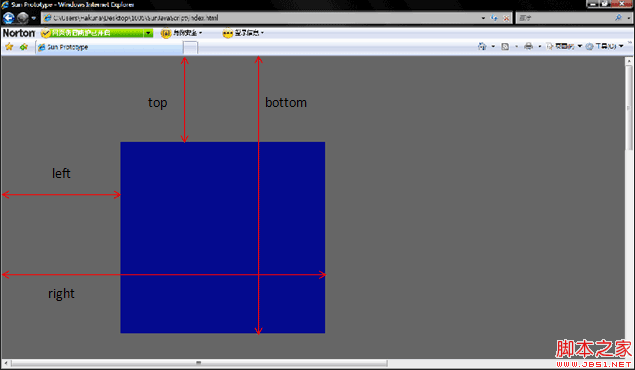
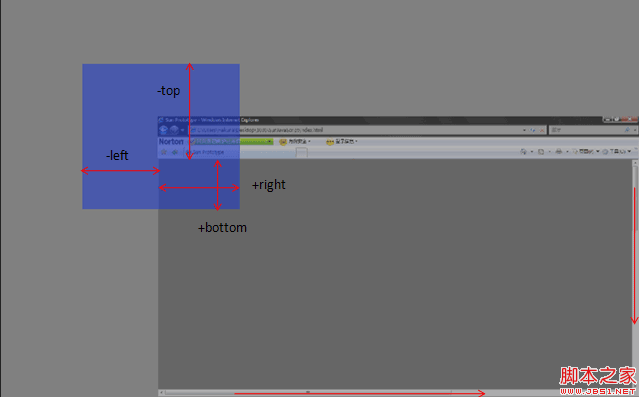
完整代码示例
代码示例如下:
具体代码实现:
<span style="font-size:14px"><!DOCTYPE html PUBLIC "-//W3C//DTD XHTML 1.0 Transitional//EN" "http://www.w3.org/TR/xhtml1/DTD/xhtml1-transitional.dtd">
<html xmlns="http://www.w3.org/1999/xhtml">
<head>
<meta http-equiv="Content-Type" content="text/html; charset=utf-8" />
<title>Demo</title>
</head>
<body style="width:2000px; height:1000px;">
<div id="demo" style="position:absolute; left:518px; right:100px; width:500px; height:500px; background:#CC0000; top: 114px;">Demo为了方便就直接用绝对定位的元素</div>
</body>
</html>
<script>
document.getElementById('demo').onclick=function (){
if (document.documentElement.getBoundingClientRect) {
alert("left:"+this.getBoundingClientRect().left)
alert("top:"+this.getBoundingClientRect().top)
alert("right:"+this.getBoundingClientRect().right)
alert("bottom:"+this.getBoundingClientRect().bottom)
<strong>var X= this.getBoundingClientRect().left+document.documentElement.scrollLeft;
var Y = this.getBoundingClientRect().top+document.documentElement.scrollTop;</strong>
alert("Demo的位置是X:"+X+";Y:"+Y)
}
}
</script></span>