

本文基于Three.js与Cannon-es物理引擎,演示如何实现类似七圣召唤的掷骰子效果。内容涵盖场景与物理世界搭建、八面体模型创建、物理Body绑定及投掷逻辑。重点探讨了在缺乏现成方案时,通过Group组合不可见标记模型并比较Y轴高度来判定骰子顶面的实现思路,同时包含锁定骰子的功能代码。
1 基础准备工作
作者利用业余时间自学了three.js。为了深入理解WebGL并熟练掌握three.js,计划模仿原神中的小游戏“七圣召唤”里的掷骰子效果,以此作为第一个练习项目。这是坚持撰写技术博客的第二周,也是首次在掘金平台发表的文章,前路漫漫,仍需努力前行。
- 为简化开发流程,直接使用vite创建了vue项目。
- 通过npm下载three.js和cannon-es这两个核心库。
1.1 构建场景
直接展示代码实现。
/**
* 创建场景对象Scene
 */
const scene = new THREE.Scene();
/**
 * 创建网格模型
 */
const geometry = new THREE.BoxGeometry(300, 300, 5); //创建一个立方体几何对象Geometry
const material = new THREE.MeshPhongMaterial({
  color: 0x845EC2,
  antialias: true,
  alpha: true
}); //材质对象Material
const desk = new THREE.Mesh(geometry, material); //网格模型对象Mesh
desk.receiveShadow = true;
desk.rotateX(Math.PI * 0.5)
scene.add(desk); //网格模型添加到场景中
//聚光灯
const light = new THREE.SpotLight(0xffffff);
light.position.set(20, 220, 100); //光源位置
light.castShadow = true;
light.shadow.mapSize.width = 2048;
light.shadow.mapSize.height = 2048;
scene.add(light); //点光源添加到场景中
//环境光
const ambient = new THREE.AmbientLight(0x666666);
scene.add(ambient);
// 相机设置
const width = window.innerWidth; //窗口宽度
const height = window.innerHeight; //窗口高度
const k = width / height; //窗口宽高比
const s = 70; //三维场景显示范围控制系数,系数越大,显示的范围越大
//创建相机对象
const camera = new THREE.OrthographicCamera(-s * k, s * k, s, -s, 1, 1000);
camera.position.set(0, 200, 450); //设置相机位置
camera.lookAt(scene.position); //设置相机方向(指向的场景对象)
/**
 * 创建渲染器对象
 */
const renderer = new THREE.WebGLRenderer({ antialias: true });
renderer.shadowMap.enabled = true;
renderer.shadowMap.type = THREE.PCFSoftShadowMap;
renderer.setSize(width, height);//设置渲染区域尺寸
renderer.setClearColor(0xb9d3ff, 1); //设置背景颜色
document.getElementById("app").appendChild(renderer.domElement) //插入canvas对象
//执行渲染操作   指定场景、相机作为参数
function render() {
  renderer.render(scene, camera);
}
render();
1.2 构建物理世界
const world = new CANNON.World();
world.gravity.set(0, -9.82, 0);
world.allowSleep = true;
const floorBody = new CANNON.Body({
  mass: 0,
  shape: new CANNON.Plane(),
  position: new CANNON.Vec3(0, 3, 0),
})
// 由于平面初始化是是竖立着的,所以需要将其旋转至跟现实中的地板一样 横着
// 在cannon.js中,我们只能使用四元数(Quaternion)来旋转,可以通过setFromAxisAngle(…)方法,第一个参数是旋转轴,第二个参数是角度
floorBody.quaternion.setFromAxisAngle(new CANNON.Vec3(-1, 0, 0), Math.PI * 0.5)
world.addBody(floorBody)
const fixedTimeStep = 1.0 / 60.0; // seconds
const maxSubSteps = 3;
// loop
let lastTime;
(function animate(time) {
  requestAnimationFrame(animate);
  if (lastTime !== undefined) {
    var dt = (time - lastTime) / 500;
    world.step(fixedTimeStep, dt, maxSubSteps);
  }
  dice_manager.update_all();
  render();
  lastTime = time;
})();
至此,基础物理世界场景搭建完毕。接下来需要编写生成骰子的函数。
2 骰子模块
2.1 骰子模型构建
实现非常简单,直接调用new THREE.OctahedronGeometry(),该构造函数返回一个八面体立方体。同时,我们需要一个八个面颜色各异的骰子。
  const rgb_arr = [
    [161, 178, 74],
    [255, 150, 75],
    [176, 103, 208],
    [219, 168, 79],
    [20, 204, 238],
    [109, 210, 192],
    [166, 228, 241],
    [255, 255, 255],
  ];
  const color_arr = [];
  rgb_arr.map((val_arr) => {
    for (let i = 0; i < 3; i++) {
      val_arr.map((val) => {
        color_arr.push(val / 255);
      });
    }
  });
  const color = new Float32Array(color_arr);
  geometry.attributes.color = new THREE.BufferAttribute(color, 3);
  const material = new THREE.MeshLambertMaterial({
    vertexColors: true,
    side: THREE.DoubleSide,
  });
  const polyhedron_mesh = new THREE.Mesh(geometry, material);
THREE.BufferAttribute接收的rgb值范围是0~1,因此需要将原始rgb值除以255进行转换。- 将
vertexColors设置为true,表明以顶点数据为准进行渲染。
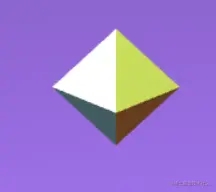
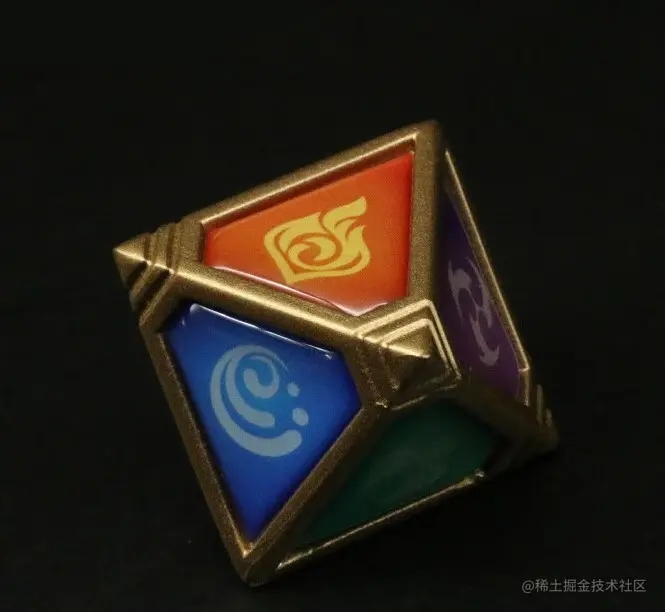
虽然效果看起来有些粗糙,但我们确实得到了一个八面骰子(由于缺乏高清元素图标贴图,只能勉强查看)。
2.2 骰子物理属性
基于上述骰子模型,生成对应的物理模型。
const create_dice_shape = (mesh) => {
  let geometry = new THREE.BufferGeometry();
  geometry.setAttribute("position", mesh.geometry.getAttribute("position"));
  geometry = mergeVertices(geometry);
  const position = geometry.attributes.position.array;
  const index = geometry.index.array;
  const vertices = [];
  // 转换成cannon需要的顶点和面
  for (let i = 0, len = position.length; i < len; i += 3) {
    vertices.push(
      new CANNON.Vec3(position[i], position[i + 1], position[i + 2])
    );
  }
  const faces = [];
  for (let i = 0, len = index.length; i < len; i += 3) {
    faces.push([index[i], index[i + 1], index[i + 2]]);
  }
  // 生成cannon凸多面体
  return new CANNON.ConvexPolyhedron({ vertices, faces });
};
利用ConvexPolyhedron可以创建一个body物理模型。
const body = new CANNON.Body({
    mass: 10,
    shape,
  });
将渲染模型与物理模型进行绑定:
update: () => {
      mesh.position.copy(body.position);
      mesh.quaternion.copy(body.quaternion);
    },
设置body参数的函数,用于实现骰子的投掷功能:
init_body: (position) => {
      body.position = position;
      // 设置加速度和向下的速度
      body.angularVelocity.set(Math.random(), Math.random(), Math.random());
      body.velocity.set(0, -80, 0);
      body.sleepState = 0; //将sleepState设为0 不然重置后不会运动
    },
效果相当不错。
2.3 判断骰子顶面
关于如何判断骰子的顶面,查阅了谷歌和百度,始终未找到理想结果。
此处吐槽一下,互联网上搜索到的几乎全是无关内容。要么是采集站,要么是大家反复转载相同的帖子,甚至还有利用开源项目牟利的现象。这让我深刻体会到了“知识库污染”的含义。
既然没有现成方案,只能自行构思。我们知道three.js中有Group类,用于将多个模型组合成一个组以便统一运动。由此想到两个可行的方案:(是否有大佬能分享更好的方法?)
方案一
将骰子每个面制作成多个mesh组合成一个THREE.Group(),在骰子停止时获取所有骰子的位置,通过THREE.Raycaster()在每个骰子上方生成射线并朝向骰子,此时相交的第一个模型即为骰子的顶面。缺点:实现过于复杂,物理模型处理困难,故放弃。
方案二
骰子模型保持不变,但在每个面上创建一个不可见的模型,并使用THREE.Group()将其绑定在一起,随骰子一起运动。停止时,获取每个骰子y轴坐标最大的定位点,即位置最高的那个面,即为骰子的顶面。缺点:暂无明显缺陷,但预计效果优于方案一。
具体实现细节
首先创建一个函数,用于在骰子相应位置创建不可见的辅助模型。
const create_basic_mesh = (position, name) => {
  const geometry = new THREE.BufferGeometry();
  const vertices = new Float32Array([0, 0, 0]);
  geometry.setAttribute("position", new THREE.BufferAttribute(vertices, 3));
  const mesh = new THREE.Mesh(geometry);
  [mesh.position.y, mesh.position.x, mesh.position.z] = position;
  mesh.name = name; //标记面的点数
  return mesh;
};
将其封装为一个组,其中顶点位置后的参数(如grass等)用于标记点数,代表游戏中的七大元素以及万能元素。
// 初始化点数位置
const init_points = (mesh) => {
  const group = new THREE.Group();
  group.add(mesh);
  group.name = "dice";
  group.add(create_basic_mesh([5, 5, 5], "grass"));
  group.add(create_basic_mesh([5, -5, 5], "universal"));
  group.add(create_basic_mesh([5, -5, -5], "water"));
  group.add(create_basic_mesh([5, 5, -5], "rock"));
  group.add(create_basic_mesh([-5, 5, 5], "fire"));
  group.add(create_basic_mesh([-5, -5, 5], "ice"));
  group.add(create_basic_mesh([-5, -5, -5], "wind"));
  group.add(create_basic_mesh([-5, 5, -5], "thunder"));
  return group;
};
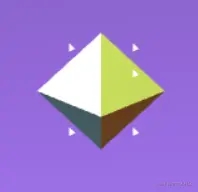
大体逻辑如此,为了方便调试,暂时将其渲染为可见状态。
判断顶面只需获取其中y轴坐标最高的那个即可。
get_top: () => {
      let top_face,
        max = 0;
      mesh.children.map((val, index) => {
        if (index == 0) return;
        val.updateMatrixWorld(); //更新模型的世界矩阵
        let worldPosition = new THREE.Vector3();
        val.getWorldPosition(worldPosition); //获取模型在世界中的位置
        if (max < worldPosition.y) {
          max = worldPosition.y;
          top_face = val.name;
        }
      });
      return top_face;
    },
2.4 锁定骰子逻辑
在七圣召唤中,每次重随都可以锁定骰子,被锁定的骰子会移至旁边且不再参与重随。
//鼠标选中模型
const choose = (event) => {
  let mouseX = event.clientX;//鼠标单击位置横坐标
  let mouseY = event.clientY;//鼠标单击位置纵坐标
  //屏幕坐标转标准设备坐标
  const x = (mouseX / window.innerWidth) * 2 - 1;
  const y = - (mouseY / window.innerHeight) * 2 + 1;
  let standardVector = new THREE.Vector3(x, y);//标准设备坐标
  //标准设备坐标转世界坐标
  let worldVector = standardVector.unproject(camera);
  //射线投射方向单位向量(worldVector坐标减相机位置坐标)
  let ray = worldVector.sub(camera.position).normalize();
  //创建射线投射器对象
  let raycaster = new THREE.Raycaster(camera.position, ray);
  raycaster.camera = camera//设置一下相机
  let intersects = raycaster.intersectObjects(dice_meshs);
  //长度大于0说明选中了骰子
  if (intersects.length > 0) {
    let dice_name = intersects[0]?.object.parent.name;
    locked_dice.push(dice_name);
    dice_manager.move_dice(dice_name, new CANNON.Vec3(135, 10, (-100 + locked_dice.length * 20))) //移动骰子
  }
}
addEventListener('click', choose); // 监听窗口鼠标单击事件
move_dice函数实现
// 移动骰子到相应位置
move_dice: (name, position) => {
      for (let i = 0; i < dice_arr.length; i++) {
        if (name == dice_arr[i].mesh.name) {
          dice_arr[i].body.position = position;
          break;
        }
      }
    },
重随时需要判断哪些骰子处于锁定状态。
init_dice: (exclude_dices) => {
      for (let i = 0; i < dice_arr.length ; i++) {
        if(!exclude_dices.includes(dice_arr[i].mesh.name)){
          dice_arr[i].init_body(new CANNON.Vec3(-(i % 4) * 21, 100, i * 6));
        }
      }
    },
按照惯例进行测试。
总结
基本功能已完工,但仍有诸多细节可逐步打磨。更多关于three.js实现七圣召唤掷骰子的资料,请关注本站其他相关文章!