

本文详细介绍在 JavaScript 中判断数组是否存在特定值或对象的方法,涵盖 indexOf、includes、find 和 findIndex 四个核心 API 的用法与区别。同时提供针对普通数组和对象数组的删除指定元素示例,帮助开发者高效处理数组数据。
一、判断是否存在某个值
1、Array.prototype.indexOf()
indexOf() 方法用于返回数组中给定元素的第一个索引位置;若未找到该元素,则返回 -1。
const beasts = ['ant', 'bison', 'camel', 'duck', 'bison'];

console.log(beasts.indexOf('bison'));
// expected output: 1

// start from index 2
console.log(beasts.indexOf('bison', 2));
// expected output: 4

console.log(beasts.indexOf('giraffe'));
// expected output: -1
2、Array.prototype.includes()
includes() 方法用于检测数组是否包含指定的值。若包含,则返回 true;若不包含,则返回 false。
const array1 = [1, 2, 3];

console.log(array1.includes(2));
// expected output: true

const pets = ['cat', 'dog', 'bat'];

console.log(pets.includes('cat'));
// expected output: true

console.log(pets.includes('at'));
// expected output: false
3、Array.prototype.find()
find() 方法返回数组中满足测试函数的第一个元素的值。如果没有任何元素满足条件,则返回 undefined。
const array1 = [5, 12, 8, 130, 44];

const found = array1.find(element => element > 10);

console.log(found);
// expected output: 12
4、Array.prototype.findIndex()
findIndex() 方法返回数组中满足测试函数的第一个元素的索引。如果未找到对应元素,则返回 -1。
const array1 = [5, 12, 8, 130, 44];

const isLargeNumber = (element) => element > 13;

console.log(array1.findIndex(isLargeNumber));
// expected output: 3
二、判断是否存在对象的某个值
1、Array.prototype.find() 同上3
const arr = [{id:1, name:'name1'}, {id:2, name:'name2'}, {id:3, name:'name3'}];

const res = arr.find((ev) => {
    return ev.id === 3;
});
console.log(res);
// expected output: { id: 3, name: "name3" }

const ret = arr.find((ev) => {
    return ev.id === 4;
});
console.log(ret);
// expected output: undefined
2、Array.prototype.findIndex() 同上4
const arr = [{id:1, name:'name1'}, {id:2, name:'name2'}, {id:3, name:'name3'}];

const res = arr.findIndex((ev) => {
    return ev.id === 3;
});
console.log(res);
// expected output: 2

const ret = arr.findIndex((ev) => {
    return ev.id === 4;
});
console.log(ret);
// expected output: -1
补充:js判断数组(数组对象)中是否存在指定的值,如果存在就删除
数组中是否存在指定值,存在就删除
var  str = ["a", "b", "c"];
    var index = str.indexOf("a");
    if(index>-1){//大于0 代表存在,
    str.splice(index,1);//存在就删除
}
console.log(str);// ["b", "c"]
数组对象中是否存在指定值(方法一),存在即删除
var searchinfo =[
                    { key: '999', name: 'zhangsan'},
                    { key: '111', name: 'lisi'},
                    { key: '222', name: 'wanger'},
                    { key: '333', name: 'apple'},
                    { key: '444', name: 'orange'},

                ]
for (var i = 0; i < searchinfo.length; i++) {
            if ((searchinfo[i].key).indexOf("999") > -1) {//判断key为999的对象是否存在,
                index = i;
                searchinfo.splice(index, 1);//存在即删除
            }
        }
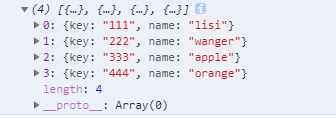
console.log(searchinfo);
运行结果:
数组对象中是否存在指定值(方法二)
var searchinfo =[
                    { key: '999', name: 'zhangsan'},
                    { key: '111', name: 'lisi'},
                    { key: '222', name: 'wanger'},
                    { key: '333', name: 'apple'},
                    { key: '444', name: 'orange'},

                ]
var str1 = searchinfo.some(item => item.key =="999");
console.log(str);//true   存在
var str2 = searchinfo.some(item => item.key =="121");
console.log(str);//false    不存在
总结
到此这篇关于如何用JS判断数组中是否存在某个值或者某个对象的值的文章就介绍到这了,更多相关JS判断数组存在某个值内容请搜索本站以前的文章或继续浏览下面的相关文章希望大家以后多多支持本站!