

本文深入分析 axios 源码中的 utils.js 文件,详细解读 kindOf、isBuffer、isPlainObject、merge 等核心工具函数的实现原理。通过源码级拆解,帮助开发者理解 axios 内部类型判断、对象合并及字符串处理机制,提升前端工程化能力。
前言
在近期的项目开发过程中,注意到项目中封装了 axios 模块。为了厘清其背后的封装原理,利用周末时间对 axios 的源代码进行了深入研究。
源码阅读
此处不再赘述 axios 的基础概念,相信读者对 axios 已有一定了解。我们将直接切入源码阅读环节,重点分析 utils.js 文件,该文件包含了大量实用的工具函数。
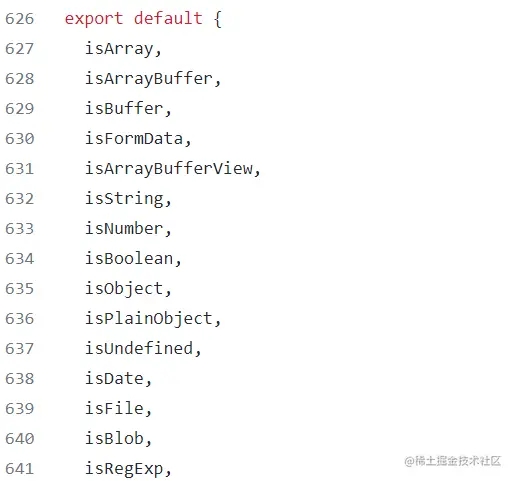
从截取的代码片段来看,utils.js 中粗略统计包含四五十个工具函数。接下来,我们将重点介绍其中一些在日常开发中较少接触或使用频率较低的工具函数,以此加深理解。
kindOf
const {toString} = Object.prototype;
const {getPrototypeOf} = Object;
const kindOf = (cache => thing => {
    const str = toString.call(thing);
    return cache[str] || (cache[str] = str.slice(8, -1).toLowerCase());
})(Object.create(null));
kindOf 函数的主要功能是获取对象的类型信息。其作用类似于 typeof,但 typeof 更侧重于判断对象的具体类型。
isBuffer
function isBuffer(val) {
    return val !== null &&
    !isUndefined(val) &&
    val.constructor !==
    null &&
    !isUndefined(val.constructor) &&
    isFunction(val.constructor.isBuffer) &&
    val.constructor.isBuffer(val);
}
Buffer 指的是缓冲区(Buffer)。isBuffer 函数用于判断传入的值是否为 buffer 类型,该类型类似于 Array 的对象结构。
该函数的判断逻辑如下:首先检查 val 是否为 null 或 undefined,接着判断 val 的构造函数是否为 null 或 undefined,最后调用 isBuffer 函数对 val 的构造函数进行进一步判断。
isArrayBufferView
function isArrayBufferView(val) {
  let result;
  if ((typeof ArrayBuffer !== 'undefined') && (ArrayBuffer.isView)) {
    result = ArrayBuffer.isView(val);
  } else {
    result = (val) && (val.buffer) && (isArrayBuffer(val.buffer));
  }
  return result;
}
isPlainObject
const isPlainObject = (val) => {
  if (kindOf(val) !== 'object') {
    return false;
  }
  const prototype = getPrototypeOf(val);
  return (
      prototype === null ||
      prototype === Object.prototype ||
      Object.getPrototypeOf(prototype) === null) &&
      !(Symbol.toStringTag in val) &&
      !(Symbol.iterator in val
  );
};
isPlainObject 函数用于判断传入的参数是否为纯对象。所谓纯对象,可以理解为纯粹通过对象字面量或构造函数创建的对象实例。
isFormData
const isFormData = (thing) => {
  const pattern = '[object FormData]';
  return thing && (
    (typeof FormData === 'function' &&
    thing instanceof FormData) ||
    toString.call(thing) === pattern ||
    (isFunction(thing.toString) && thing.toString() === pattern)
  );
}
isFormData 函数用于判断传入的参数 thing 是否为 isFormData 类型的实例。
trim
function trim(str) {
  return str.trim ? str.trim() : str.replace(/^\s+|\s+$/g, '');
}
此方法在项目开发中偶有使用,但频率不高。其主要功能是去除字符串两侧的空格字符。
findKey
function findKey(obj, key) {
  key = key.toLowerCase();
  const keys = Object.keys(obj);
  let i = keys.length;
  let _key;
  while (i-- > 0) {
    _key = keys[i];
    if (key === _key.toLowerCase()) {
      return _key;
    }
  }
  return null;
}
从函数名称即可推测其用途,Key 函数用于查找对象中对应值的键名,即返回键值对中的键。
merge
function merge(/* obj1, obj2, obj3, ... */) {
    const {caseless} = isContextDefined(this) && this || {};
    const result = {};
    const assignValue = (val, key) => {
        const targetKey = caseless && findKey(result, key) || key;
        if (isPlainObject(result[targetKey]) && isPlainObject(val)) {
            result[targetKey] = merge(result[targetKey], val);
        } else if (isPlainObject(val)) {
            result[targetKey] = merge({}, val);
        } else if (isArray(val)) {
            result[targetKey] = val.slice();
        } else {
            result[targetKey] = val;
        }
    }
    for (let i = 0, l = arguments.length; i < l; i++) {
        arguments[i] && forEach(arguments[i], assignValue);
    }
    return result;
}
从参数列表可以看出,该函数接收多个对象作为参数。结合 merge 表示“合并”的含义,可以推断该函数用于合并多个对象。在合并逻辑中,可以看到对 merge 函数的调用。
stripBOM
function stripBOM(content) {
  if (content.charCodeAt(0) === 0xFEFF) {
    content = content.slice(1);
  }
  return content;
}
此函数用于去除编码中的 BOM 标记,这在处理某些特定格式的文件时较为常见,但在日常开发中较少直接涉及。
endsWith
const endsWith = (str, searchString, position) => {
  str = String(str);
  if (position === undefined || position > str.length) {
    position = str.length;
  }
  position -= searchString.length;
  const lastIndex = str.indexOf(searchString, position);
  return lastIndex !== -1 && lastIndex === position;
}
根据传入参数 str,searchString, position 推测,该函数与判断字符串位置相关。结合 lastIndex === position 的逻辑,其作用是判断字符串(str)是否以指定的字符串(searchString)结尾(position)。
toArray
const toArray = (thing) => {
  if (!thing) return null;
  if (isArray(thing)) return thing;
  let i = thing.length;
  if (!isNumber(i)) return null;
  const arr = new Array(i);
  while (i-- > 0) {
    arr[i] = thing[i];
  }
  return arr;
}
该函数可将类数组对象转换为真正的数组。其内部逻辑实现较为直观,相对简单易懂。
toCamelCase
const toCamelCase = str => {
  return str.toLowerCase().replace(/[_-\s]([a-z\d])(\w*)/g,
    function replacer(m, p1, p2) {
      return p1.toUpperCase() + p2;
    }
  );
};
熟悉驼峰命名法的开发者应能理解,该函数用于将字符串转换为驼峰命名格式。例如,将 abcdef 转换为 abcDef 的形式。
总结
仅阅读一遍源码是远远不够的,因为其中涵盖了大量的工具函数。本文仅阅读并解析了其中十几种。通过初步研读 axios 的源码,我对 axios 有了更深入的认识。关于剩余的源码部分,计划在下周继续抽空完成阅读与学习。总体而言,建议多次研读 axios 源码,每次阅读或许都会有新的收获。
以上即为关于 axios 工具函数的详细内容,更多相关技术资料请关注本站其他文章。