

本文介绍如何使用JavaScript实现一个简单的随机抽奖功能。通过点击按钮触发setInterval定时器,动态切换DOM元素的样式以模拟滚动效果,并利用clearInterval停止动画。文章提供了完整的HTML结构、CSS布局及JS逻辑代码,适合前端初学者参考学习。
JavaScript随机抽奖功能实现
本文分享了一个使用JavaScript实现的随机抽奖示例代码,供读者参考。
用户点击开始按钮后,程序会启动动画,使页面上的div元素依次高亮显示红色。以下是具体的JavaScript实现代码,有需要的可以自行获取。
<script>
        var but1 = document.getElementById("btn1")
        var but2 = document.getElementById("btn2")
        var alldiv = document.querySelectorAll(".father>div")
        console.log(alldiv);
        var index = 0;
        var flag = 0;
        but1.onclick=function(){
            if(flag == 0)
            {
                 t = setInterval(()=>{

                 index= index>=(alldiv.length-1)?0:++index;
                 alldiv[index].style.backgroundColor = "gold";
                 if(index !=0){
                    alldiv[index-1].style.backgroundColor = "#fff";
                 }else if(index==0){
                    alldiv[19].style.backgroundColor = "#fff";
                 }


                //  alldiv[index].style.backgroundColor = "red";
                 console.log(index)

            },1)
            flag = 1;
            }

            but2.onclick=function(){
            clearInterval(t);
            flag = 0;
        }
        }

</script>
接下来展示实现该功能所需的HTML结构和CSS样式代码。
<style>
    .father{
        width: 600px;
        height: 600px;
        /* border: 1px solid darkorchid; */
        position: relative;
        margin: 20px auto;
    }

    input{
        width: 100px;
        height: 100px;
    }
   .son1{
       width: 100px;
       height: 100px;
       position: absolute;
       top: 0;
       left: 0;
       border: 1px solid brown;
       text-align: center;
       line-height: 100px;
   }
   .son2{
       width: 100px;
       height: 100px;
       position: absolute;
       top: 0;
       left: 100px;
       border: 1px solid brown;
       text-align: center;
       line-height: 100px;
   }
   .son3{
       width: 100px;
       height: 100px;
       position: absolute;
       top: 0;
       left: 200px;
       border: 1px solid brown;
       text-align: center;
       line-height: 100px;
   }
   .son4{
       width: 100px;
       height: 100px;
       position: absolute;
       top: 0;
       left: 300px;
       border: 1px solid brown;
       text-align: center;
       line-height: 100px;
   }
   .son5{
       width: 100px;
       height: 100px;
       position: absolute;
       top: 0;
       left: 400px;
       border: 1px solid brown;
       text-align: center;
       line-height: 100px;
   }
   .son6{
       width: 100px;
       height: 100px;
       position: absolute;
       top: 0;
       left: 500px;
       border: 1px solid brown;
       text-align: center;
       line-height: 100px;
   }
   .son7{
       width: 100px;
       height: 100px;
       position: absolute;
       top: 100px;
       right: -2px;
       border: 1px solid brown;
       text-align: center;
       line-height: 100px;
   }
   .son8{
       width: 100px;
       height: 100px;
       position: absolute;
       top: 200px;
       right: -2px;
       border: 1px solid brown;
       text-align: center;
       line-height: 100px;
   }
   .son9{
       width: 100px;
       height: 100px;
       position: absolute;
       top: 300px;
       right: -2px;
       border: 1px solid brown;
       text-align: center;
       line-height: 100px;
   }
   .son10{
       width: 100px;
       height: 100px;
       position: absolute;
       top: 400px;
       right: -2px;
       border: 1px solid brown;
       text-align: center;
       line-height: 100px;
   }
   .son11{
       width: 100px;
       height: 100px;
       position: absolute;
       top: 500px;
       right: -2px;
       border: 1px solid brown;
       text-align: center;
       line-height: 100px;
   }
   .son12{
       width: 100px;
       height: 100px;
       position: absolute;
       bottom: -2px;
       right: 100px;
       border: 1px solid brown;
       text-align: center;
       line-height: 100px;
   }
   .son13{
       width: 100px;
       height: 100px;
       position: absolute;
       bottom: -2px;
       right: 200px;
       border: 1px solid brown;
       text-align: center;
       line-height: 100px;
   }
   .son14{
       width: 100px;
       height: 100px;
       position: absolute;
       bottom: -2px;
       right: 300px;
       border: 1px solid brown;
       text-align: center;
       line-height: 100px;
   }
   .son15{
       width: 100px;
       height: 100px;
       position: absolute;
       bottom: -2px;
       right: 400px;
       border: 1px solid brown;
       text-align: center;
       line-height: 100px;
   }
   .son16{
       width: 100px;
       height: 100px;
       position: absolute;
       bottom: -2px;
       right: 500px;
       border: 1px solid brown;
       text-align: center;
       line-height: 100px;
   }
   .son17{
       width: 100px;
       height: 100px;
       position: absolute;
       bottom: 98px;
       right: 500px;
       border: 1px solid brown;
       text-align: center;
       line-height: 100px;
   }
   .son18{
       width: 100px;
       height: 100px;
       position: absolute;
       bottom: 198px;
       right: 500px;
       border: 1px solid brown;
       text-align: center;
       line-height: 100px;
   }
   .son19{
       width: 100px;
       height: 100px;
       position: absolute;
       bottom: 298px;
       right: 500px;
       border: 1px solid brown;
       text-align: center;
       line-height: 100px;
   }
   .son20{
       width: 100px;
       height: 100px;
       position: absolute;
       bottom: 398px;
       right: 500px;
       border: 1px solid brown;
       text-align: center;
       line-height: 100px;
   }

    #btn1{
        position:absolute;
        top: 250px;
        left: 200px;
    }
    #btn2{
        position:absolute;
        top: 250px;
        left: 300px;

    }
</style>
<body>
    <div class="father">

        <input type="button" value="开始" id="btn1">
        <input type="button" value="停止" id="btn2">
        <div class="son1">1</div>
        <div class="son2">2</div>
        <div class="son3">3</div>
        <div class="son4">4</div>
        <div class="son5">5</div>
        <div class="son6">6</div>
        <div class="son7">7</div>
        <div class="son8">8</div>
        <div class="son9">9</div>
        <div class="son10">10</div>
        <div class="son11">11</div>
        <div class="son12">12</div>
        <div class="son13">13</div>
        <div class="son14">14</div>
        <div class="son15">15</div>
        <div class="son16">16</div>
        <div class="son17">17</div>
        <div class="son18">18</div>
        <div class="son19">19</div>
        <div class="son20" >20</div>

</div>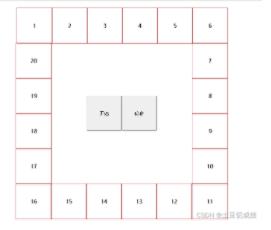
上述代码运行后即可看到最终的抽奖效果。
以上内容为本文的全部介绍,希望能为读者的学习提供一定帮助,同时也欢迎大家继续支持本站。