

本文详细介绍如何使用 Vue3 开发一个仿苹果系统的侧边消息提示组件。通过手动挂载实例、动态计算垂直偏移量实现堆叠效果,并结合事件总线解决通信问题。涵盖自动关闭、鼠标悬停暂停及自定义配置等核心功能,提供完整的代码实现与使用指南。
动效预览
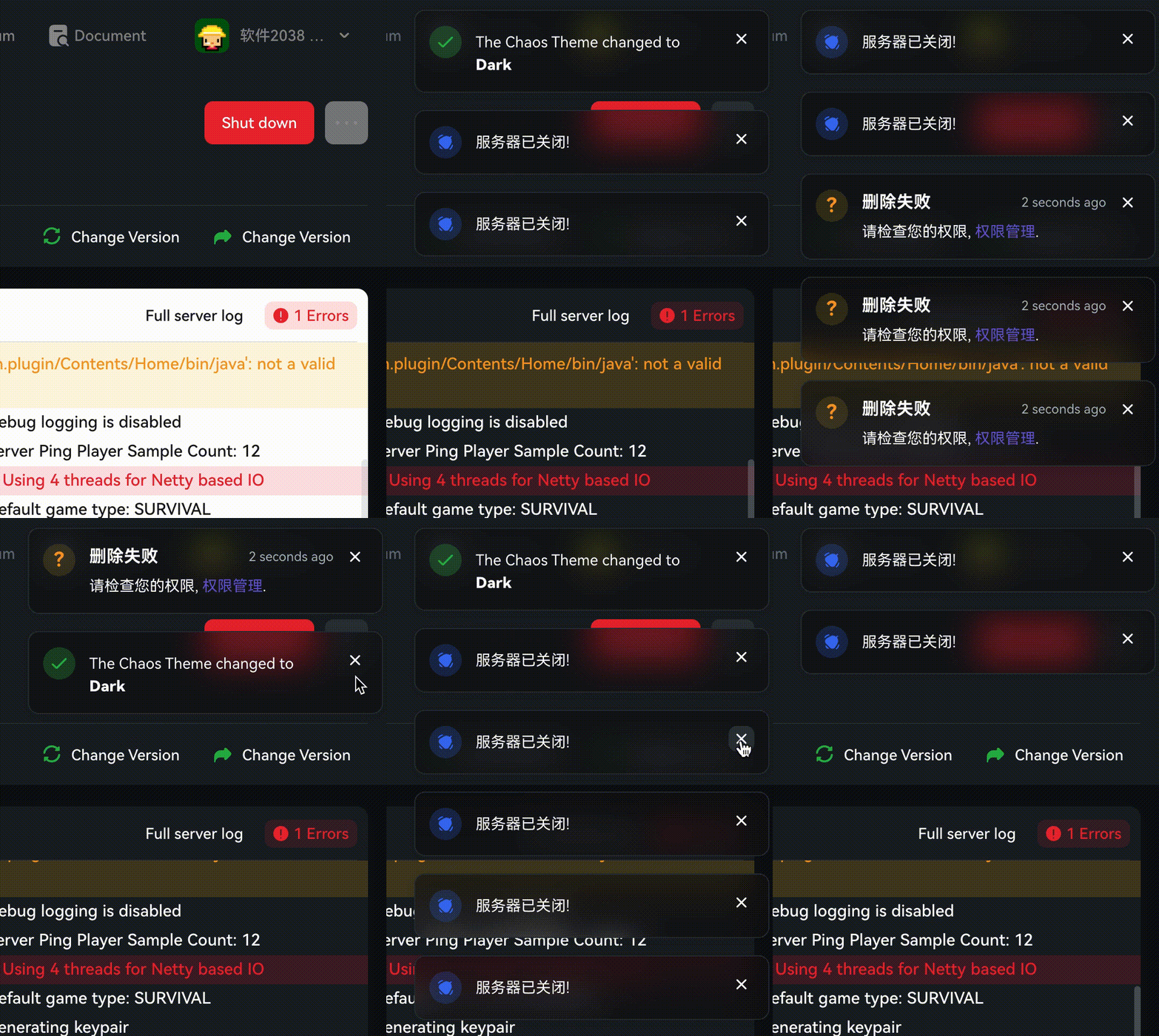
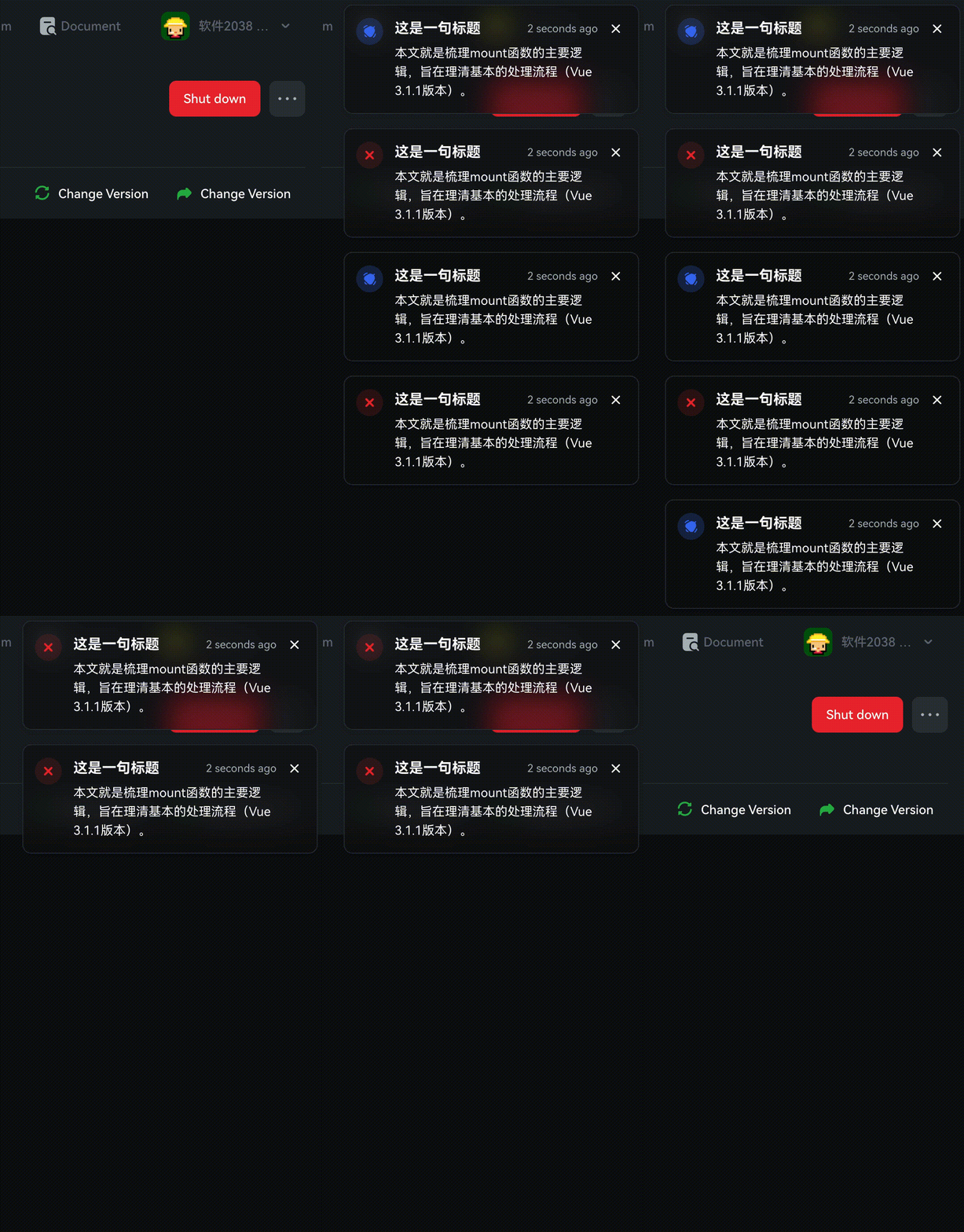
近期在毕业设计项目中,计划集成一个类似苹果操作系统的侧边消息通知栏。首先展示一下最终实现的视觉效果。
其他UI库
熟悉前端框架的开发者可能注意到,Element UI 中对应此功能的组件名为 Notification 通知,而在 Bootstrap 框架中则称为 Toasts。
开始
该组件的交互效果颇具吸引力,本文将逐步拆解实现过程。如有疏漏或优化建议,欢迎指正。(注:本组件基于 Vue3 构建)
组件目录结构
Toasts
|
| -- index.js // 负责组件注册及全局变量定义,便于外部调用
|
| -- instance.js // 处理手动创建实例前后的逻辑流程
|
| -- toasts.vue // 定义消息提示的 HTML 结构部分
|
| -- toastsBus.js // 提供 Vue3 移除 $on 和 $emit 后的替代通信方案
toasts.vue
大概的DOM结构
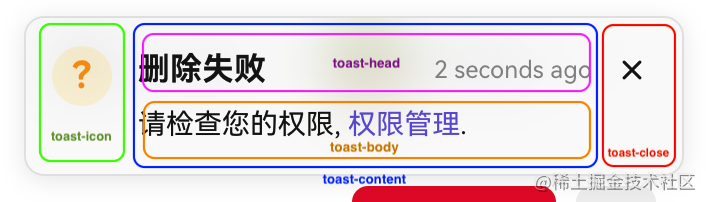
<!-- 弹窗 -->
<div class="toast-container">
    <!-- icon图标 -->
    <template>
        ...
    </template>
    <!-- 主要内容 -->
    <div class="toast-content">
        <!-- 标题及其倒计时 -->
        <div class="toast-head">
            ...
        </div>
        <!-- body -->
        <div class="toast-body">...</div>
        <!-- 操作按钮 -->
        <div class="toast-operate">
            ...
        </div>
    </div>
    <!-- 关闭 -->
    <div class="toast-close">
        <i class="fi fi-rr-cross-small"></i>
    </div>
</div>
index.js
注册组件 & 定义全局变量
在此步骤中完成组件注册,并定义全局属性以便后续直接调用。
import toast from './instance'
import Toast from './toasts.vue'

export default (app) => {
    // 注册组件
    app.component(Toast.name, Toast);
    // 注册全局变量, 后续只需调用 $Toast({}) 即可
    app.config.globalProperties.$Toast = toast;
}
instance.js
手动挂载实例
🌟🌟🌟 这里是全文的重点 🌟🌟🌟
首先介绍如何将组件实例手动挂载到页面 DOM 中。
import { createApp } from 'vue';
import Toasts from './toasts'

const toasts = (options) => {
    // 创建父容器
    let root = document.createElement('div');
    document.body.appendChild(root)
    // 创建Toasts实例
    let ToastsConstructor = createApp(Toasts, options)
    // 挂载父亲元素
    let instance = ToastsConstructor.mount(root)
    // 抛出实例本身给vue
    return instance
}
export default toasts;
给每一个创建的 toasts 正确的定位
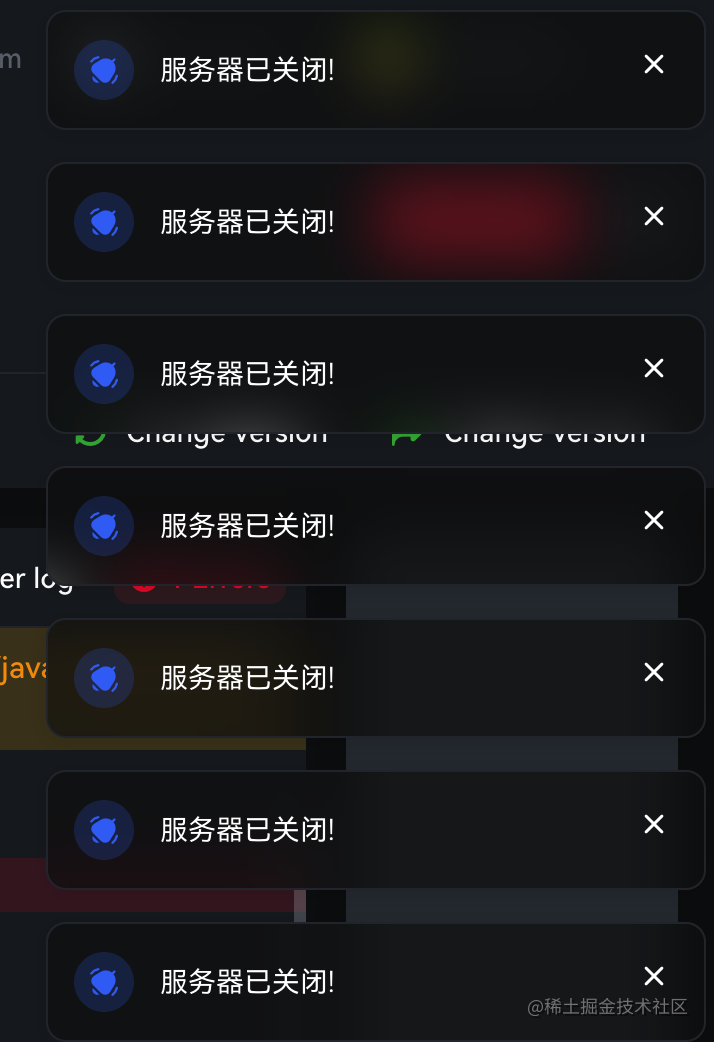
如图所示,每生成一个新的 toast 组件,它会自动排列在前一个组件的下方(间距固定为 16px)。实现此效果的关键在于获取已存在 toast 的高度信息。
// instance.js

// 这里我们需要定义一个数组来存放当前存活的 toasts
let instances = []

const toasts = (options) => {
    ...
    // 创建后将实例加入数组
    instances.push(instance)

    // 重制高度
    let verticalOffset = 0
    // 遍历获取当前已存活的 toasts 高度及其间隙 累加
    instances.forEach(item => {
        verticalOffset += item.$el.offsetHeight + 16
    })
    // 累加本身需要的间隙
    verticalOffset += 16
    // 赋值当前实例y轴方向便宜长度
    instance.toastPosition.y = verticalOffset
    ...
}
export default toasts;
加入 主动&定时 关闭功能
接下来分析该模块的业务逻辑:
- 定时关闭:在创建 toast 时传入自动关闭的时间参数,计时器结束后自动执行关闭操作。
- 主动关闭:用户点击关闭按钮时立即关闭 toast。
在此基础上可增加人性化交互,例如当鼠标移入某个 toast 时暂停其自动关闭计时(不影响其他 toast),鼠标移出后恢复自动关闭逻辑。
<!-- toasts.vue -->
<template>
    <transition name="toast" @after-leave="afterLeave" @after-enter="afterEnter">
        <div ref="container" class="toast-container" :style="toastStyle" v-show="visible" @mouseenter="clearTimer" @mouseleave="createTimer">
            ...
            <!-- 关闭 -->
            <div class="toast-close"  @click="destruction">
                <i class="fi fi-rr-cross-small"></i>
            </div>
        </div>
    </transition>
</template>

<script>
import Bus from './toastsBus'
import {ref, computed, onMounted, onBeforeUnmount} from 'vue'
export default {
    props: {
        // 自动关闭时间 (单位毫秒)
        autoClose: {
            type: Number,
            default: 4500
        }
    },
    setup(props){
        // 是否显示
        const visible = ref(false);

        // toast容器实例
        const container = ref(null);
        // toast本身高度
        const height = ref(0);

        // toast位置
        const toastPosition = ref({
            x: 16,
            y: 16
        })
        const toastStyle = computed(()=>{
            return {
                top: `${toastPosition.value.y}px`,
                right: `${toastPosition.value.x}px`,
            }
        })

        // toast的id
        const id = ref('')

        // toast离开动画结束后
        function afterLeave(){
            // 告诉 instance.js 需要进行关闭操作 ()
            Bus.$emit('closed',id.value);
        }
        // toast进入动画结束后
        function afterEnter(){
            height.value = container.value.offsetHeight
        }

        // 定时器
        const timer = ref(null);

        // 鼠标进入toast
        function clearTimer(){
             if(timer.value)
                clearTimeout(timer.value)
        }
        // 鼠标移出toast
        function createTimer(){
           if(props.autoClose){
                timer.value = setTimeout(() => {
                    visible.value = false
                }, props.autoClose)
            }
        }

        // 销毁
        function destruction(){
            visible.value = false
        }

        onMounted(()=>{
            createTimer();
        })

        onBeforeUnmount(()=>{
            if(timer.value)
                clearTimeout(timer.value)
        })


        return {
            visible,
            container,
            height,
            toastPosition,
            toastStyle,
            id,
            afterLeave,
            afterEnter,
            timer,
            clearTimer,
            createTimer,
            destruction
        }
    }
}
</script>
我们来分析一下 instance.js 中 toast 关闭时的逻辑
- 将该 toast 从存活实例数组中移除,并遍历数组,将从该位置开始的后续 toast 向上位移以填补空隙。
- 从 <body> 中移除对应的 DOM 元素。
- 调用 unmount() 方法销毁 Vue 实例。
// instance.js
import { createApp } from 'vue';
import Toasts from './toasts'
import Bus from './toastsBus'

let instances = []
let seed = 1

const toasts = (options) => {
    // 手动挂载实例
    let ToastsConstructor = createApp(Toasts, options)
    let instance = ToastsConstructor.mount(root)
    // 给实例加入唯一标识符
    instance.id = id
    // 显示实例
    instance.visible = true

    ...

    // 监听 toasts.vue 传来关闭事件
    Bus.$on('closed', (id) => {
        // 因为这里会监听到所有的 ‘closed' 事件, 所以要匹配 id 确保
        if (instance.id == id) {
            // 调用删除逻辑
            removeInstance(instance)
            // 在 <body> 上删除dom元素
            document.body.removeChild(root)
            // 销毁实例
            ToastsConstructor.unmount();
        }
    })

    instances.push(instance)
    return instance
}

export default toasts;

// 删除逻辑
const removeInstance = (instance) => {
    if (!instance) return
    let len = instances.length
    // 找出当前需要销毁的下标
    const index = instances.findIndex(item => {
        return item.id === instance.id
    })
    // 从数组中删除
    instances.splice(index, 1)
    // 如果当前数组中还存在存活 Toasts, 需要遍历将下面的Toasts上移, 重新计算位移
    if (len <= 1) return
    // 获取被删除实例的高度
    const h = instance.height
    // 遍历被删除实例以后下标的 Toasts
    for (let i = index; i < len - 1; i++) {
        // 公式: 存活的实例将本身的 y 轴偏移量减去被删除高度及其间隙高度
        instances[i].toastPosition.y = parseInt(instances[i].toastPosition.y - h - 16)
    }
}
完整代码
index.js
import toast from './instance'
import Toast from './toasts.vue'

export default (app) => {
    app.component(Toast.name, Toast);
    app.config.globalProperties.$Toast = toast;
}
toastsBus.js
import emitter from 'tiny-emitter/instance'

export default {
    $on: (...args) => emitter.on(...args),
    $once: (...args) => emitter.once(...args),
    $off: (...args) => emitter.off(...args),
    $emit: (...args) => emitter.emit(...args)
}
instance.js
import { createApp } from 'vue';
import Toasts from './toasts'
import Bus from './toastsBus'

let instances = []
let seed = 1

const toasts = (options) => {
    // 创建父容器
    const id = `toasts_${seed++}`
    let root = document.createElement('div');
    root.setAttribute('data-id', id)
    document.body.appendChild(root)
    let ToastsConstructor = createApp(Toasts, options)
    let instance = ToastsConstructor.mount(root)
    instance.id = id
    instance.visible = true
        // 重制高度
    let verticalOffset = 0
    instances.forEach(item => {
        verticalOffset += item.$el.offsetHeight + 16
    })
    verticalOffset += 16

    instance.toastPosition.y = verticalOffset

    Bus.$on('closed', (id) => {
        if (instance.id == id) {
            removeInstance(instance)
            document.body.removeChild(root)
            ToastsConstructor.unmount();
        }
    })
    instances.push(instance)
    return instance
}

export default toasts;

const removeInstance = (instance) => {
    if (!instance) return
    let len = instances.length
    const index = instances.findIndex(item => {
        return item.id === instance.id
    })
    instances.splice(index, 1)
    if (len <= 1) return
    const h = instance.height
    for (let i = index; i < len - 1; i++) {
        instances[i].toastPosition.y = parseInt(instances[i].toastPosition.y - h - 16)
    }
}
toast.vue
加入亿点点细节, 例如icon可以自定义或者是图片, 可以取消关闭按钮, 设置自动关闭时长, 或者停用自动关闭功能.
<template>
<transition name="toast" @after-leave="afterLeave" @after-enter="afterEnter">
  <!-- 弹窗 -->
  <div ref="container" class="toast-container" :style="toastStyle" v-show="visible" @mouseenter="clearTimer" @mouseleave="createTimer">
    <!-- icon -->
    <template v-if="type || type != 'custom' || type != 'img'">
        <div class="toast-icon success" v-if="type==='success'">
            <i class="fi fi-br-check"></i>
        </div>
        <div class="toast-icon warning" v-if="type==='warning'">
            ?
        </div>
        <div class="toast-icon info" v-if="type==='info'">
            <i class="fi fi-sr-bell-ring"></i>
        </div>
        <div class="toast-icon error" v-if="type==='error'">
            <i class="fi fi-br-cross-small"></i>
        </div>
    </template>
    <div :style="{'backgroundColor': customIconBackground}" class="toast-icon" v-if="type==='custom'" v-html="customIcon"></div>
    <img class="toast-custom-img" :src="customImg" v-if="type==='img'"/>
    <!-- content -->
    <div class="toast-content">
        <!-- head -->
        <div class="toast-head" v-if="title">
            <!-- title -->
            <span class="toast-title">{{title}}</span>
            <!-- time -->
            <span class="toast-countdown">{{countDown}}</span>
        </div>
        <!-- body -->
        <div class="toast-body" v-if="message" v-html="message"></div>
        <!-- operate -->
        <div class="toast-operate">
            <a class="toast-button-confirm"
               :class="[{'success':type==='success'},
                        {'warning':type==='warning'},
                        {'info':type==='info'},
                        {'error':type==='error'}]">{{confirmText}}</a>
        </div>
    </div>
    <!-- 关闭 -->
    <div v-if="closeIcon" class="toast-close"  @click="destruction">
        <i class="fi fi-rr-cross-small"></i>
    </div>
  </div>
  </transition>
</template>

<script>
import Bus from './toastsBus'
import {ref, computed, onMounted, onBeforeUnmount} from 'vue'
export default {
    props: {
        title: String,
        closeIcon: {
            type: Boolean,
            default: true
        },
        message: String,
        type: {
            type: String,
            validator: function(val) {
                return ['success', 'warning', 'info', 'error', 'custom', 'img'].includes(val);
            }
        },
        confirmText: String,
        customIcon: String,
        customIconBackground: String,
        customImg: String,
        autoClose: {
            type: Number,
            default: 4500
        }
    },
    setup(props){
        // 显示
        const visible = ref(false);

        // 容器实例
        const container = ref(null);

        // 高度
        const height = ref(0);

        // 位置
        const toastPosition = ref({
            x: 16,
            y: 16
        })
        const toastStyle = computed(()=>{
            return {
                top: `${toastPosition.value.y}px`,
                right: `${toastPosition.value.x}px`,
            }
        })

        // 倒计时
        const countDown = computed(()=>{
            return '2 seconds ago'
        })

        const id = ref('')

        // 离开以后
        function afterLeave(){
            Bus.$emit('closed',id.value);
        }
        // 进入以后
        function afterEnter(){
            height.value = container.value.offsetHeight
        }

        // 定时器
        const timer = ref(null);

        // 鼠标进入
        function clearTimer(){
             if(timer.value)
                clearTimeout(timer.value)
        }
        // 鼠标移出
        function createTimer(){
           if(props.autoClose){
                timer.value = setTimeout(() => {
                    visible.value = false
                }, props.autoClose)
            }
        }

        // 销毁
        function destruction(){
            visible.value = false
        }

        onMounted(()=>{
            createTimer();
        })

        onBeforeUnmount(()=>{
            if(timer.value)
                clearTimeout(timer.value)
        })

        return {
            visible,
            toastPosition,
            toastStyle,
            countDown,
            afterLeave,
            afterEnter,
            clearTimer,
            createTimer,
            timer,
            destruction,
            container,
            height,
            id
        }
    }
}
</script>

<style lang="scss" scoped>
// 外部容器
.toast-container{
    width: 330px;
    box-shadow: rgba(0, 0, 0, 0.1) 0px 2px 12px 0px;
    background-color: rgba(#F7F7F7, .6);
    border: 1px solid #E5E5E5;
    padding: 14px 13px;
    z-index: 1001;
    position: fixed;
    top: 0;
    right: 0;
    border-radius: 10px;
    backdrop-filter: blur(15px);
    display: flex;
    align-items: stretch;
    transition: all .3s ease;
    will-change: top,left;
}
// -------------- icon --------------
.toast-icon, .toast-close{
    flex-shrink: 0;
}
.toast-icon{
    width: 30px;
    height: 30px;
    border-radius: 100%;
    display: inline-flex;
    align-items: center;
    justify-content: center;
}
// 正确
.toast-icon.success{
    background-color: rgba(#2BB44A, .15);
    color: #2BB44A;
}
// 异常
.toast-icon.warning{
    background-color: rgba(#ffcc00, .15);
    color: #F89E23;
    font-weight: 600;
    font-size: 18px;
}
// 错误
.toast-icon.error{
    font-size: 18px;
    background-color: rgba(#EB2833, .1);
    color: #EB2833;
}
// 信息
.toast-icon.info{
    background-color: rgba(#3E71F3, .1);
    color: #3E71F3;
}
// 自定义图片
.toast-custom-img{
    width: 40px;
    height: 40px;
    border-radius: 10px;
    overflow: hidden;
    flex-shrink: 0;
}
// ------------- content -----------
.toast-content{
    padding: 0 8px 0 13px;
    flex: 1;
}
// -------------- head --------------
.toast-head{
    display: flex;
    align-items: center;
    justify-content: space-between;
}
// title
.toast-title{
    font-size: 16px;
    line-height: 24px;
    color: #191919;
    font-weight: 600;
    overflow: hidden;
    text-overflow: ellipsis;
    white-space: nowrap;
}
// time
.toast-countdown{
    font-size: 12px;
    color: #929292;
    line-height: 18.375px;
}
// --------------- body -----------
.toast-body{
    color: #191919;
    line-height: 21px;
    padding-top: 5px;
}
// ---------- close -------
.toast-close{
    padding: 3px;
    cursor: pointer;
    font-size: 18px;
    width: 24px;
    height: 24px;
    border-radius: 8px;
    display: inline-flex;
    align-items: center;
    justify-content: center;
}
.toast-close:hover{
    background-color: rgba(#E4E4E4, .5);
}
// --------- operate ----------
.toast-button-confirm{
    font-weight: 600;
    color: #3E71F3;
}
.toast-button-confirm:hover{
    color: #345ec9;
}
// 成功
.toast-button-confirm.success{
    color: #2BB44A;
}
.toast-button-confirm.success:hover{
    color: #218a3a;
}
// 异常
.toast-button-confirm.warning{
    color: #F89E23;
}
.toast-button-confirm.warning:hover{
    color: #df8f1f;
}
// 信息
.toast-button-confirm.info{
    color: #3E71F3;
}
.toast-button-confirm.info:hover{
    color: #345ec9;
}
// 错误
.toast-button-confirm.error{
    color: #EB2833;
}
.toast-button-confirm.error:hover{
    color: #c9101a;
}


/*动画*/
.toast-enter-from,
.toast-leave-to{
  transform: translateX(120%);
}
.v-leave-from,
.toast-enter-to{
  transform: translateX(00%);
}
</style>
main.js
import { createApp } from 'vue'
import App from './App.vue'

const app = createApp(App)

import '@/assets/font/UIcons/font.css'

// 安装toasts
import toasts from './components/toasts'

app.use(toasts).mount('#app')
使用
<template>
    <button @click="clickHandle">发送</button>
</template>

<script>
import { getCurrentInstance } from 'vue'
export default {
  setup(){
    const instance = getCurrentInstance()
    function clickHandle(){
      // 这里调用 vue3 的全局变量时比较羞耻, 不知道各位大佬有没有其他好办法
      instance.appContext.config.globalProperties.$Toast({
        type: 'info',
        title: '这是一句标题',
        message: '本文就是梳理mount函数的主要逻辑,旨在理清基本的处理流程(Vue 3.1.1版本)。'
      })
    }
    return {
      clickHandle
    }
  }
}
</script>
icon图标字体获取
www.flaticon.com/
总结
到此这篇关于利用vue3仿苹果系统侧边消息提示效果的文章就介绍到这了,更多相关vue3仿苹果侧边消息提示内容请搜索本站以前的文章或继续浏览下面的相关文章希望大家以后多多支持本站!