

本文介绍如何使用JavaScript和CSS实现前端搜索框的数据匹配与显示功能。核心逻辑包括通过CSS设置搜索框样式,利用JS监听输入事件,遍历数组并使用indexOf进行内容比对,最终动态渲染匹配结果或提示暂无数据。
JavaScript实现前端搜索框数据匹配与显示
本文分享了一段利用JavaScript实现搜索数据显示的完整代码示例,供读者参考学习。
最终实现的界面效果如图所示。
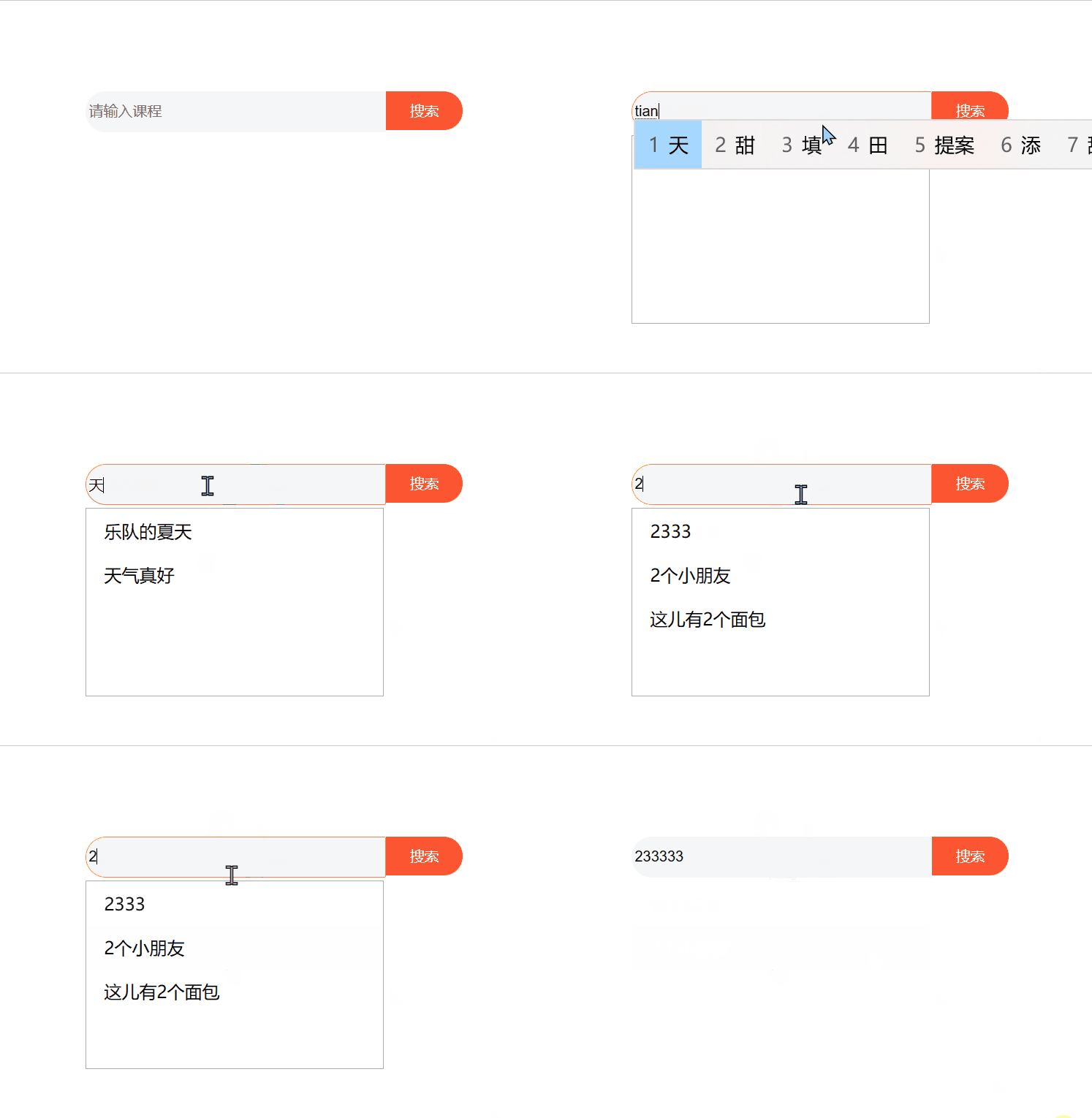
该案例主要包含两个核心要点:
第一点涉及CSS样式的设置。
第二点则是通过JavaScript比较用户输入内容与数组数据,从而展示匹配的结果。
首先分析CSS样式部分的难点:
为了让两个div元素紧密接触且无缝隙,需要设置float:left;。
对于div盒子左右两侧的圆角边框,需分别对border-top-left-radius等属性赋值,从而构建出搜索框的基本样式,其余细节可查阅完整代码。
接下来介绍JavaScript中进行数据比对的部分:
整体逻辑为:当用户输入内容时,下方显示区域出现并展示匹配数据;若无输入或无匹配项,则隐藏数据区或显示“暂无数据”提示;当搜索框失去焦点时,下方显示区域隐藏。
具体实现步骤如下:
1. 当用户在搜索框中输入内容时,触发onkeyup函数,首先将下方显示区域的display属性设置为block;
随后调用forEach遍历数组中的所有数据,通过value属性获取用户输入的内容,并调用indexOf将该内容与数组元素进行比对。若存在匹配项,该方法返回对应数据的索引;若无匹配,则返回-1;
若存在匹配项,利用innerHTML在下方显示框中插入p标签,内容即为匹配的数据;若无匹配项,则插入内容为“暂无数据”的p标签。
2. 当搜索框失去焦点时,将下方显示区域的display属性设置为none即可。
完整代码如下:
<!DOCTYPE html>
<html lang="en">

<head>
    <meta charset="UTF-8">
    <meta http-equiv="X-UA-Compatible" content="IE=edge">
    <meta name="viewport" content="width=device-width, initial-scale=1.0">
    <title>Document</title>
    <style>
        .container {
            width: 500px;
            height: 160px;
            padding: 40px;
            margin: 100px auto
        }

        #one {
            width: 268px;
            height: 33px;
            float: left;
            border: 0;
            border-top-left-radius: 20px;
            border-bottom-left-radius: 20px;
            background-color: rgb(245, 246, 247);
            outline: none;
        }

        #search {
            background-color: rgb(252, 85, 49);
            color: white;
            width: 70px;
            height: 35px;
            line-height: 35px;
            text-align: center;
            font-size: 13px;
            border-radius: 20px;
            border-top-left-radius: 0;
            border-bottom-left-radius: 0;
            float: left;
        }

        #show {
            width: 270px;
            height: 170px;
            border: 1px solid rgba(77, 76, 76, 0.459);
            display: none;
            margin-top: 40px;
            overflow: hidden;
        }
        #show div{
            width: 100%;
            height: 40px;
            line-height: 40px;
            text-indent: 1em;
            display: block;
        }
        #show div:hover{
            background-color: rgb(240, 240, 245);
            cursor:pointer;
        }
    </style>
</head>

<body>
    <div class="container">
        <div id="nav">
            <input type="text" id="one" placeholder="请输入课程" autocomplete="on">
            <div id="search">搜索</div>
        </div>
        <div id="show">
            <div></div>
        </div>
    </div>

    <script>
        let arr = ['蛋糕便宜卖', '想吃水果', '2333', 'css精品课程','2个小朋友','这儿有2个面包','我们一起','乐队的夏天','天气真好'];
        let one = document.getElementById("one");
        let show = document.getElementById("show")

        one.onfocus = function () {
            show.style.display = "block";
            one.style.border = "1px coral solid"
            one.onkeyup = function () {
                let str = '';
                let tem=false;
                arr.forEach((item) => {
                    let index = item.indexOf(one.value);
                    if (~index) {
                        tem=true;
                        str+='<div>'+item+'</div>';//每次都更新str的值,所以不用担心重复
                    }
                })
                //很重要
                if(one.value=='' || !tem){
                    show.innerHTML='<div>'+'暂无结果'+'</div>';
                }
                else{
                    show.innerHTML=str;
                }
            }

        }
        //onblur 的事件会在对象失去焦点时发生
        one.onblur = function () {
            show.style.display = "none"
            one.style.border = "1px transparent solid"
            show.innerHTML='';
        }
    </script>
</body>

</html>
以上就是本文的全部内容,希望能为读者的学习提供帮助,也欢迎大家继续支持本站。