

本文介绍基于Vue.js实现的购物车功能,支持以店铺为单位的商品管理。核心逻辑涵盖店铺全选、商品单选、数量增减及删除操作。通过计算属性实时统计已选商品的总数量与合计价格,适用于电商前端开发参考。
Vue购物车店铺级全选与价格计算实现
本文分享了一段使用JavaScript实现的购物车计算完整代码示例,供开发者参考学习。
该功能以店铺为基本单位进行组织,每个店铺下包含对应的商品选项。交互逻辑支持店铺全选、单个商品勾选、店铺单选、调整商品数量以及删除商品等操作。
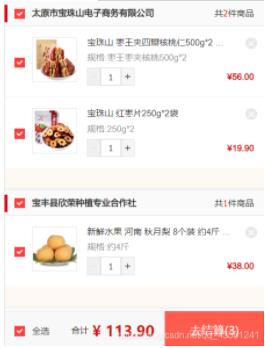
具体实现代码如下:
<script>
export default {
    data() {
        return {
            count:0,            //所有商品的数量和
            shopCarList: [],    //所有商品
            selectList:[]       //已选择的商品
        }
    },
    computed: {
        //选择的合计价格
        selectPrice(){
            return this.selectList.reduce((total,item,index)=>{
                return total+item.quantity*(item.activityPrice || item.price);
            },0)
        },
        //选择的合计数量
        selectNum(){
            return this.selectList.reduce((total,item,index)=>{
                return total+item.quantity;
            },0)
        },
        //是否全选
        isSelecetAll(){
            return this.shopCarList.every(item=>{
                return item.shopSelect===true
            })
        }
    },
    methods: {
        //增加
        increment(itm){
            itm.quantity<itm.stock?itm.quantity++:'';
        },
        //减少
        decrement(itm){
            itm.quantity>1?itm.quantity--:''
        },
        //全选点击
        allChooseHandle(){
            this.initSelectAll(!this.isSelecetAll);
        },
        //商品单选点击
        productChooseHandle(itm,index){
            let productFlag = !itm.productSelect;
            this.$set(itm,'productSelect',productFlag);

            let shopFlag = this.shopCarList[index].products.every(i=>{
                return i.productSelect===true;
            })
            this.$set(this.shopCarList[index],'shopSelect',shopFlag);
            this.getSelected();
        },
        //店铺单选点击
        shopChooseHandle(item,index){
            let Flag = !item.shopSelect;
            this.$set(item,'shopSelect',Flag);
            item.products.forEach((itm,idx)=>{
                this.$set(itm,'productSelect',Flag);
            })
            this.getSelected();
        },
        //获取已选商品
        getSelected(){
            let tempArr = [];
            this.shopCarList.forEach((item,index)=>{
                item.products.forEach((itm,idx)=>{
                    if(itm.productSelect){
                        tempArr.push(itm);
                    }
                })
            })
            this.selectList = tempArr;
        },
        //是否全选初始化
        initSelectAll(Flag){
            this.shopCarList.forEach((item,index)=>{
                this.$set(item,'shopSelect',Flag);
                item.products.forEach((itm,idx)=>{
                    this.$set(itm,'productSelect',Flag);
                })
            })
            this.getSelected();
        },
        //获取购物车列表
        getCarList(){
            return this.$api.personal.getCarList().then(res=>{
                if(res.result==='000'){
                    //过期商品数
                    let expiredNum = 0;
                    res.data.expiredList.forEach(item=>{
                        item.products.forEach(itm=>{
                            expiredNum += itm.quantity
                        })
                    })
                    //有效商品数量
                    this.count = res.data.count - expiredNum;
                    this.shopCarList = res.data.shopCarList;
                    return Promise.resolve()
                }
            })
        },
        //删除点击
        delCarList(itm,index,idx){
            this.$api.personal.delCarList( [itm.carId] ).then(res=>{
                if(res.result==='000'){
                    this.count  -= itm.quantity;
                    this.shopCarList[index].products.splice(idx,1);
                    if(this.shopCarList[index].products.length===0){
                        this.shopCarList.splice(index,1);
                    }
                    this.getSelected();
                }
            })
        },
    },
    created() {
        this.getCarList().then(()=>{
            this.initSelectAll(true);
        });
    },
};
</script>
以上就是本文的全部内容,希望对大家的学习有所帮助,也希望大家多多支持本站。