

本文介绍 TypeScript 2.3 引入的泛型参数默认类型功能,展示如何通过为 Props 和 State 设置默认 any 类型简化 React 组件迁移。同时详解 --strict 编译选项,该选项自动启用 strictNullChecks、noImplicitAny 等严格检查,并通过 tsc --init 生成包含注释的标准配置文件,帮助开发者快速建立高类型安全的项目基础。
概述
TypeScript 2.3 新增声明泛型参数默认类型的功能,支持为泛型类型中的类型参数指定默认值。
下文演示如何将 React 组件从 JavaScript (JSX) 迁移至 TypeScript (TSX),利用泛型参数默认值实现。
class Greeting extends react.Component {
  render() {
    return <span>Hello, {this.props.name}!</span>;
  }
}
构建组件类的类型定义
首先定义 Component 类的类型。基于类的 React 组件包含 props 和 state 两个属性,其类型定义结构如下:
declare namespace React {
  class Component {
    props: any;
    state: any;
  }
}
此示例经过简化,旨在演示泛型类型参数及其默认值的用法。
随后,可通过继承上述定义的 Component 来使用它:
class Greeting extends React.Component {
  render() {
    return <span>Hello, {this.props.name}!</span>
  }
}
可按以下方式创建组件实例:
<Greeting name="world" />渲染该组件将生成如下 HTML 结构:
<span>Hello, World!</span>效果良好,继续后续步骤。
利用泛型类型定义 Props 与 State
尽管上述示例能编译运行,但 Component 类型定义精度不足。由于 props 和 state 被设为 any 类型,TypeScript 编译器无法提供有效辅助。
需更明确地定义类型,通过引入 Props 和 State 两个泛型类型参数,以精确描述 props 和 state 的结构。
declare namespace React {
  class Component <Props, State> {
    props: Props;
    state: State;
  }
}
接着定义 GreetingProps 类型,包含一个 string 类型的 name 属性,并将其作为 Props 类型参数的实参传递:
type GreetingProps = { name: string };

class Greeting extends React.Component<GreetingProps, any> {
  render() {
    return <span>Hello, {this.props.name}!</span>;
  }
}
1) GreetingProps 作为类型参数 Props 的实参
2) 同理,any 作为类型参数 State 的实参
具备这些类型后,组件可获得更优的类型检查与自动提示功能:
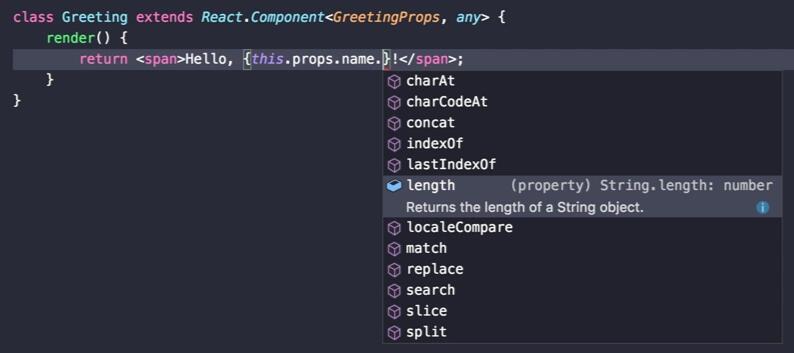
然而,使用 React.Component 类时必须提供两种类型。这导致初始代码示例无法通过正确的类型检查:
// Error: 泛型类型 Component<Props, State>
// 需要 2 个类型参数。
class Greeting extends React.Component {
  render() {
    return <span>Hello, {this.props.name}!</span>;
  }
}
若不想指定如 GreetingProps 这样的具体类型,可为 Props 和 State 类型参数提供 any 类型以修正代码:
class Greeting extends React.Component<any, any> {
  render() {
    return <span>Hello, {this.props.name}!</span>;
  }
}
此方法可使编译器通过,但存在更优雅的方案:泛型参数默认类型。
泛型参数默认类型
自 TypeScript 2.3 起,可为每个泛型类型参数添加默认类型。如下例所示,若未显式提供类型参数,Props 和 State 均默认为 any 类型:
declare namespace React {
  class Component<Props = any, State = any> {
    props: Props;
    state: State;
  }
}
此时,无需指定泛型类型即可通过编译器检查:
class Greeting extends React.Component {
  render() {
    return <span>Hello, {this.props.name}!</span>;
  }
}
当然,仍可显式为 Props 类型参数提供类型以覆盖默认的 any 类型,如下所示:
type GreetingProps = { name: string };

class Greeting extends React.Component<GreetingProps, any> {
  render() {
    return <span>Hello, {this.props.name}!</span>;
  }
}
两个类型参数现均有默认值,故为可选。可仅指定 Props 的显式类型参数:
type GreetingProps = { name: string };
class Greeting extends React.Component<GreetingProps> {
  render() {
    return <span>Hello, {this.props.name}!</span>;
  }
}
注意,仅提供了一个类型参数。但被省略的可选类型参数前一个必须指定类型,否则不可省略。
其他示例
在上一篇关于 TypeScript 2.2 混合类的文章中,最初声明了以下两个类型别名:
type constructor<T> = new (...args: any[]) => T;
type constructable = Constructor<{}>;
Constructable 类型仅为语法糖,可替代 Constructor<{}> 类型,从而无需每次书写泛型类型参数。利用泛型参数默认值,可完全移除附加的可构造类型,并将 {} 设为默认类型。
type Constructor<T = {}> = new (...args: any[]) => T;语法稍显复杂,但生成代码更简洁,效果良好。
新的 --strict 主要编译选项
TypeScript 2.3 引入新的 --strict 编译器选项,支持多项与更严格类型检查相关的其他编译器选项。
TypeScript 新增的检查项通常默认关闭以避免破坏现有项目。虽然避免不兼容有益,但该策略使配置最高类型安全变得复杂,每次发布新版本均需显式添加新选项。通过 --strict 编译选项,可选择最高级别的类型安全(注意:随着编译器版本更新增加增强型类型检查特性,可能会报告新错误)。
新的 --strict 编译器选项包含一组建议配置的类型检查选项。具体而言,指定 --strict 相当于指定以下所有选项(未来可能包含更多选项):
- --strictNullChecks
- --noImplicitAny
- --noImplicitThis
- --alwaysStrict
未来的 TypeScript 版本可能在此集合中添加额外的类型检查选项。这意味着无需监控每个 TypeScript 版本以获取项目中应启用的新严格性选项。若向上述选项集添加新选项,则在升级项目 TypeScript 版本后,它们将自动激活。
--strict 编译选项为上述列出的编译器选项设置默认值。这意味着仍可单独控制这些选项。例如:
--strict --noImplicitThis false
或在 tsconfig.json 文件中指定:
{
  "strict": true,
  "alwaysStrict": false
}
这将开启除 --noImplicitThis 编译选项以外的所有严格检查选项。使用此方式可表述除某些明确列出的项以外的所有严格检查项。换言之,现在可在默认最高级别的类型安全下排除部分检查。
改进的 --init 输出
除默认启用 --strict 设置外,tsc --init 的输出亦得到改进。tsc --init 默认生成的 tsconfig.json 文件现包含一些带描述的、被注释掉的常用编译器选项。去除相关选项的注释即可获得期望结果。希望新的输出能简化新项目配置,并在项目成长过程中保持配置文件的可读性。
通过 tsc --init 编译器可为构建配置文件:
$ tsc --init
message TS6071: Successfully created a tsconfig.json file.
运行此命令后,会在当前工作目录中生成一个 tsconfig.json 文件,生成的配置如下所示:
{
  "compilerOptions": {
    /* Basic Options */
    "target": "es5",                          /* Specify ECMAScript target version: 'ES3' (default), 'ES5', 'ES2015', 'ES2016', 'ES2017', or 'ESNEXT'. */
    "module": "commonjs",                     /* Specify module code generation: 'commonjs', 'amd', 'system', 'umd' or 'es2015'. */
    // "lib": [],                             /* Specify library files to be included in the compilation:  */
    // "allowJs": true,                       /* Allow JavaScript files to be compiled. */
    // "checkJs": true,                       /* Report errors in .js files. */
    // "jsx": "preserve",                     /* Specify JSX code generation: 'preserve', 'react-native', or 'react'. */
    // "declaration": true,                   /* Generates corresponding '.d.ts' file. */
    // "sourceMap": true,                     /* Generates corresponding '.map' file. */
    // "outFile": "./",                       /* Concatenate and emit output to single file. */
    // "outDir": "./",                        /* Redirect output structure to the directory. */
    // "rootDir": "./",                       /* Specify the root directory of input files. Use to control the output directory structure with --outDir. */
    // "removeComments": true,                /* Do not emit comments to output. */
    // "noEmit": true,                        /* Do not emit outputs. */
    // "importHelpers": true,                 /* Import emit helpers from 'tslib'. */
    // "downlevelIteration": true,            /* Provide full support for iterables in 'for-of', spread, and destructuring when targeting 'ES5' or 'ES3'. */
    // "isolatedModules": true,               /* Transpile each file as a separate module (similar to 'ts.transpileModule'). */

    /* Strict Type-Checking Options */
    "strict": true                            /* Enable all strict type-checking options. */
    // "noImplicitAny": true,                 /* Raise error on expressions and declarations with an implied 'any' type. */
    // "strictNullChecks": true,              /* Enable strict null checks. */
    // "noImplicitThis": true,                /* Raise error on 'this' expressions with an implied 'any' type. */
    // "alwaysStrict": true,                  /* Parse in strict mode and emit "use strict" for each source file. */

    /* Additional Checks */
    // "noUnusedLocals": true,                /* Report errors on unused locals. */
    // "noUnusedParameters": true,            /* Report errors on unused parameters. */
    // "noImplicitReturns": true,             /* Report error when not all code paths in function return a value. */
    // "noFallthroughCasesInSwitch": true,    /* Report errors for fallthrough cases in switch statement. */

    /* Module Resolution Options */
    // "moduleResolution": "node",            /* Specify module resolution strategy: 'node' (Node.js) or 'classic' (TypeScript pre-1.6). */
    // "baseUrl": "./",                       /* Base directory to resolve non-absolute module names. */
    // "paths": {},                           /* A series of entries which re-map imports to lookup locations relative to the 'baseUrl'. */
    // "rootDirs": [],                        /* List of root folders whose combined content represents the structure of the project at runtime. */
    // "typeRoots": [],                       /* List of folders to include type definitions from. */
    // "types": [],                           /* Type declaration files to be included in compilation. */
    // "allowSyntheticDefaultImports": true,  /* Allow default imports from modules with no default export. This does not affect code emit, just typechecking. */

    /* Source Map Options */
    // "sourceRoot": "./",                    /* Specify the location where debugger should locate TypeScript files instead of source locations. */
    // "mapRoot": "./",                       /* Specify the location where debugger should locate map files instead of generated locations. */
    // "inlineSourceMap": true,               /* Emit a single file with source maps instead of having a separate file. */
    // "inlineSources": true,                 /* Emit the source alongside the sourcemaps within a single file; requires '--inlineSourceMap' or '--sourceMap' to be set. */

    /* Experimental Options */
    // "experimentalDecorators": true,        /* Enables experimental support for ES7 decorators. */
    // "emitDecoratorMetadata": true,         /* Enables experimental support for emitting type metadata for decorators. */
  }
}
注意 --strict 默认启用。这意味着启动新的 TypeScript 项目时,自动进入默认模式。
--checkJS 选项下 .js 文件中的错误
即便使用了 --allowJs,TypeScript 编译器默认不会报告 .js 文件中的任何错误。TypeScript 2.3 中使用 --checkJs 选项,.js 文件中的类型检查错误也可被报告。
可通过为它们添加 // @ts-nocheck 注释来跳过对某些文件的检查。反之,也可选择通过添加 // @ts-check 注释仅检查一些 .js 文件,而无需设置 --checkJs 编译选项。也可通过添加 // @ts-ignore 到特定行的一行前来忽略这一行的错误。
.js 文件仍会被检查以确保仅使用标准的 ECMAScript 特性,类型标注仅在 .ts 文件中被允许,在 .js 中会被标记为错误。JSDoc 注释可用于为 JS 代码添加某些类型信息,
以上即为 TypeScript 泛型参数默认类型和新的 strict 编译选项的详细内容,更多关于 TypeScript 的资料请关注本站其它相关文章!