
通过监听 window 的 mousemove 事件获取全局坐标,再减去 iframe 相对于视口的偏移量(使用 getBoundingClientRect() ),即可得到鼠标在 iframe 内部的内容坐标系中的位置。

当前位置:首页 > JavaScript DOM 与事件 > 正文
JS获取iframe内部或跨窗口鼠标位置的方法
作者:交互手记
时间:2026-11-26
浏览:413
文章目录
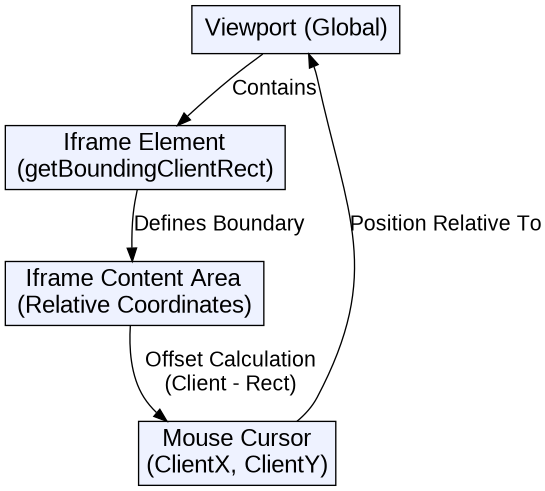
计算 iframe 相对坐标的原理
浏览器提供的 event.clientX 和 event.clientY 是相对于浏览器视口(viewport)的绝对像素值。iframe 作为页面中的一个元素,其左上角也有自己的视口偏移量。要获得 iframe 内部的坐标,核心逻辑是用全局坐标减去 iframe 的边界框偏移量。
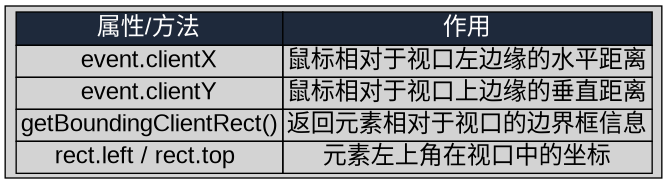
关键在于准确获取 iframe 元素的边界信息。推荐使用 DOM API 中的 getBoundingClientRect() 方法,它返回一个包含 top、left、width、height 等属性的对象,且不受页面滚动影响,比手动累加 offsetParent 更稳定可靠。需确保 iframe 与主窗口同源,否则跨域访问会触发安全限制,无法读取 iframe 的尺寸或注入脚本。
完整实现与运行示例
以下代码演示了如何在主窗口中监听鼠标移动,并实时输出 iframe 内部的相对坐标。请将此代码保存为 HTML 文件并在本地服务器或支持 iframe 的环境中运行。

<!DOCTYPE html>
<html lang="zh">
<head>
    <meta charset="UTF-8">
    <title>Iframe Mouse Position</title>
    <style>
        body { font-family: sans-serif; padding: 20px; }
        #output { margin-top: 10px; font-weight: bold; color: #333; }
        iframe { border: 2px solid #ccc; width: 600px; height: 400px; display: block; margin-bottom: 10px; }
    </style>
</head>
<body>
    <h3>鼠标在 iframe 内的相对坐标</h3>
    <!-- 使用同源页面作为 iframe 源,此处用 data URI 模拟 -->
    <iframe id="myFrame" srcdoc="<html><body style='margin:0;background:#f0f0f0;height:100%;'>Move mouse here</body></html>"></iframe>
    <div id="output">X: 0, Y: 0</div>

    <script>
        const iframe = document.getElementById('myFrame');
        const outputDiv = document.getElementById('output');

        // 等待 iframe 加载完成后绑定事件
        iframe.onload = function() {
            window.addEventListener('mousemove', handleMouseMove);
        };

        function handleMouseMove(event) {
            // 获取 iframe 相对于视口的位置
            const rect = iframe.getBoundingClientRect();

            // 计算 iframe 内部的相对坐标
            const relativeX = event.clientX - rect.left;
            const relativeY = event.clientY - rect.top;

            // 可选:检查鼠标是否在 iframe 区域内
            if (relativeX >= 0 && relativeX <= rect.width &&
                relativeY >= 0 && relativeY <= rect.height) {
                outputDiv.textContent = `X: ${Math.round(relativeX)}, Y: ${Math.round(relativeY)}`;
                outputDiv.style.color = '#007bff';
            } else {
                outputDiv.textContent = 'Mouse outside iframe';
                outputDiv.style.color = '#999';
            }
        }
    </script>
</body>
</html>
运行后,在 iframe 灰色区域内移动鼠标,下方文字会实时显示 X 和 Y 坐标。移出 iframe 区域时,提示变为灰色。该程序直接解决了跨层级坐标转换问题,适用于调试 UI 交互或开发基于位置的插件。
程序先获取 iframe 元素引用,绑定 mousemove 事件。每次移动时,计算差值并更新页面上的显示区域。若 iframe 设置了边框或内边距,需注意 CSS 盒模型对视觉位置的影响,但 getBoundingClientRect 已包含这些布局信息,因此计算出的坐标直接对应 iframe 内容区的左上角起点。
处理 iframe 缩放或动态尺寸变化
当 iframe 大小发生动态变化(如响应式调整)时,之前的偏移量可能失效。由于我们每次都在事件回调中重新调用 getBoundingClientRect(),因此能自动适应最新的布局状态,无需额外监听 resize 事件来更新缓存的偏移量。
如果 iframe 内部有复杂的嵌套结构或 CSS transform 变换,getBoundingClientRect 返回的是变换后的最终位置,这通常符合预期。但若需要精确到 iframe 内部特定子元素的坐标,可进一步递归计算子元素的偏移。本方案适用于大多数标准场景,确保在 iframe 加载完成后再绑定事件,避免 null 引用错误。
实用工具推荐
电子包浆
使用 ›绿化、压缩、噪点和虚拟水印,自由调节做旧程度。
图片压缩
使用 ›选择画质和输出格式,预览压缩前后的大小。
作者最新文章
相关文章