
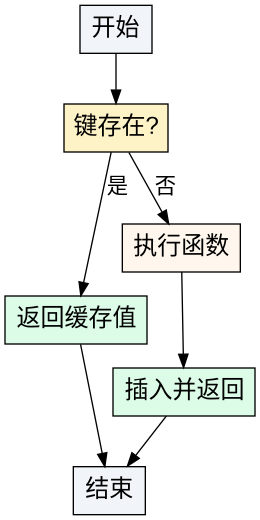
直接看参数: getOrInsert 接受一个值,而 getOrInsertComputed 接受一个函数。区别在于值的计算时机——前者立即求值并缓存,后者仅在键不存在时调用函数生成值。

当前位置:首页 > JavaScript 对象与原型 > 正文
ES2026的getOrInsert和getOrInsertComputed有什么区别?
作者:闭包旅人
时间:2026-11-25
浏览:386
文章目录

核心差异与适用场景
Map 的这两个方法都用于存在则返回、不存在则插入的场景,但处理逻辑不同。getOrInsert 适合传入已知常量或已计算好的对象;getOrInsertComputed 适合需要延迟计算或依赖当前 Map 状态的复杂逻辑。

使用 getOrInsert 时,即使键已存在,传入的参数也会被求值(虽然不存入),这可能带来不必要的性能开销或副作用。getOrInsertComputed 保证函数只在缺失时执行一次,且能访问当前 Map 实例作为参数,便于构建自引用结构。
代码实现与对比测试
以下程序演示两种方法的实际行为差异,重点展示重复调用时的计算次数和返回值一致性。
const map = new Map();
let computeCount = 0;

// 模拟耗时计算
function expensiveCalc(key) {
  computeCount++;
  console.log(`Computing for key: ${key}`);
  return { value: key.length * 10 };
}

// 测试 getOrInsert
console.log('--- getOrInsert ---');
const val1 = map.getOrInsert('key1', expensiveCalc('key1'));
console.log('First call result:', val1);
const val2 = map.getOrInsert('key1', expensiveCalc('key1'));
console.log('Second call result:', val2);
console.log('Compute count after getOrInsert:', computeCount);

// 重置计数器
computeCount = 0;
map.clear();

// 测试 getOrInsertComputed
console.log('\n--- getOrInsertComputed ---');
const val3 = map.getOrInsertComputed('key1', (k, m) => {
  computeCount++;
  console.log(`Computing for key: ${k}`);
  return { value: k.length * 10 };
});
console.log('First call result:', val3);
const val4 = map.getOrInsertComputed('key1', (k, m) => {
  computeCount++;
  console.log(`Computing for key: ${k}`);
  return { value: k.length * 10 };
});
console.log('Second call result:', val4);
console.log('Compute count after getOrInsertComputed:', computeCount);
输出显示,getOrInsert 在第二次调用时仍会执行 expensiveCalc(因为参数求值发生在函数调用前),导致 computeCount 增加。而 getOrInsertComputed 在第二次调用时直接返回缓存值,computeCount 不再增加。这证明了 computed 版本的惰性求值特性。
运行该脚本,观察控制台输出中 compute 打印的次数即可验证差异。
getOrInsertComputed 的闭包陷阱
当 computed 函数内部引用了外部变量但未正确捕获时,可能导致意外结果。
在示例中,我们使用了闭包来模拟状态依赖。如果外部变量被修改,需确保 computed 函数能获取最新值或明确其作用域限制。通常建议将依赖数据显式传入或通过 this 上下文传递,避免隐式闭包带来的调试困难。
实用工具推荐
电子包浆
使用 ›绿化、压缩、噪点和虚拟水印,自由调节做旧程度。
图片压缩
使用 ›选择画质和输出格式,预览压缩前后的大小。
作者最新文章
相关文章